Video Distribution Strategy for Developer Audiences
YouTube search and recommendation algorithms matter more than audience size for developer video.

Summary
YouTube search and recommendation algorithms matter more than audience size for developer video.
Developers pick their video platforms in an order most marketing teams get wrong. The 2025 Stack Overflow Developer Survey (49,000+ respondents, 177 countries) put YouTube third among community platforms at ~61%, behind Stack Overflow (84%) and GitHub (67%). YouTube sits next to the two tools developers treat as daily infrastructure, a different neighborhood entirely from the apps people open to kill time between meetings.
If you split the results by the respondents' level of experience, the picture sharpens. Developers still learning to code use YouTube at 70%, working professionals at 60%. Ten points of gap, and that gap tells you something: YouTube is where people go when they don't know what they don't know yet. Most video playbooks start by sizing an audience and chasing the biggest one. Starting with what resources a developer actually draws on to find a solution to a problem in a time crunch captures the behavior that matters more reliably than a persona slide built in a workshop.
How Developers Actually Watch Video
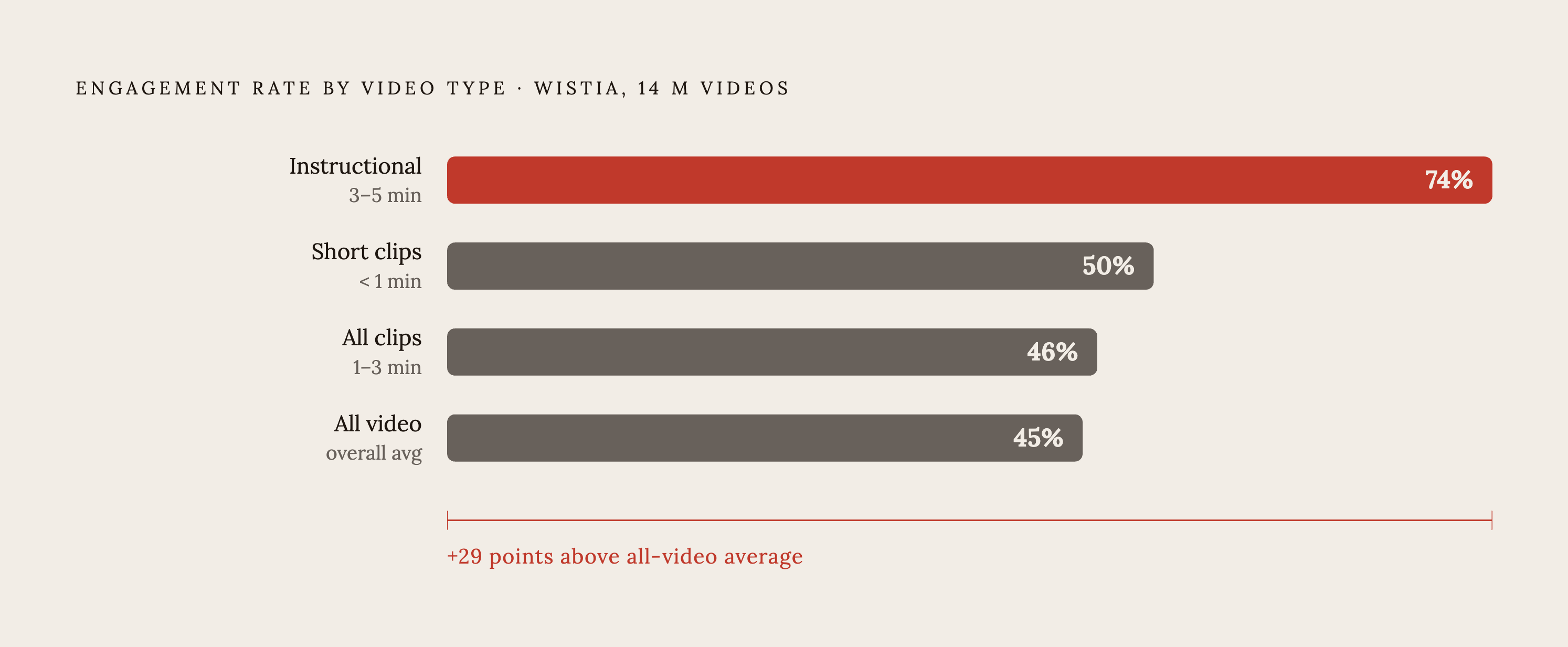
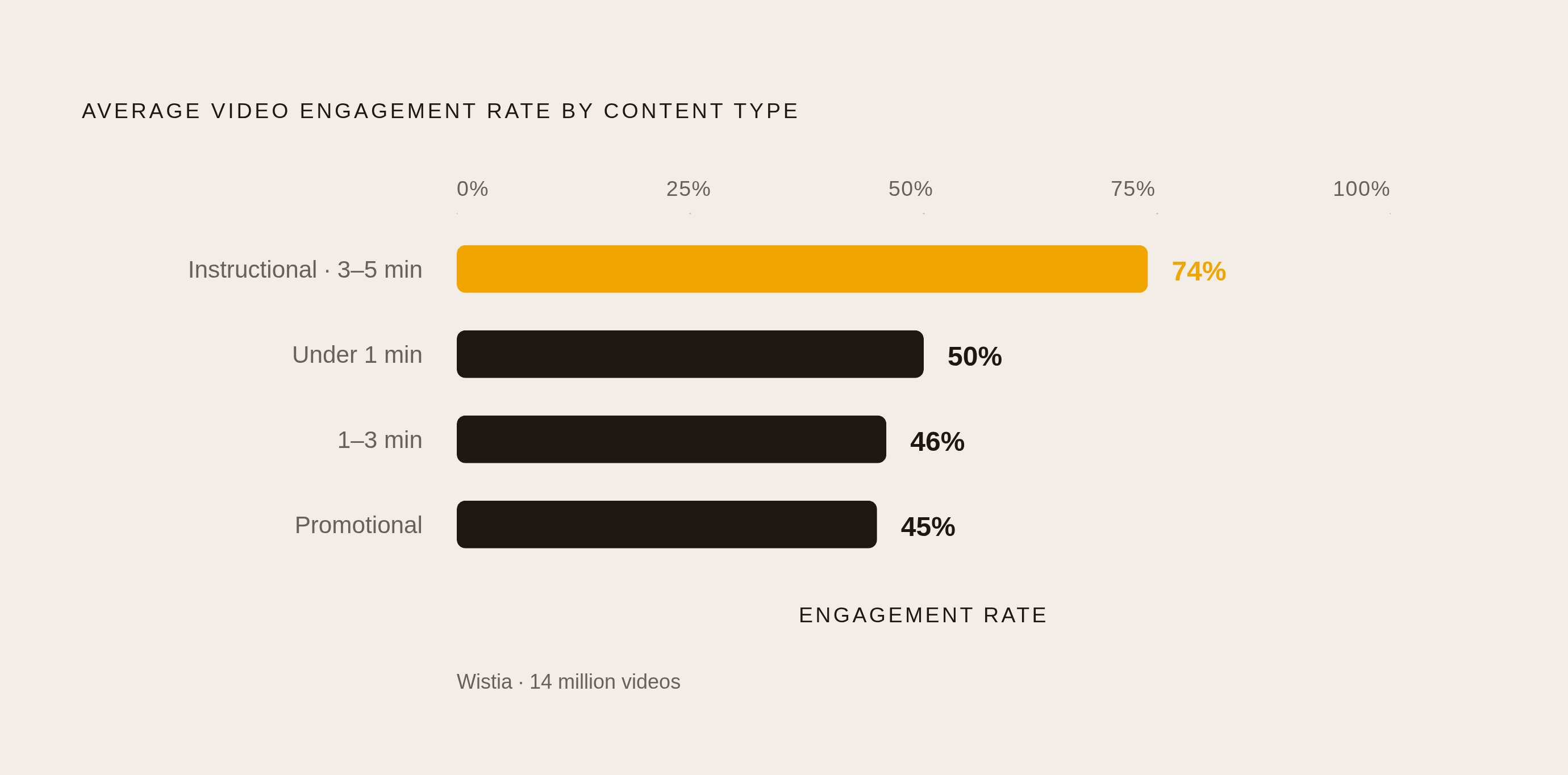
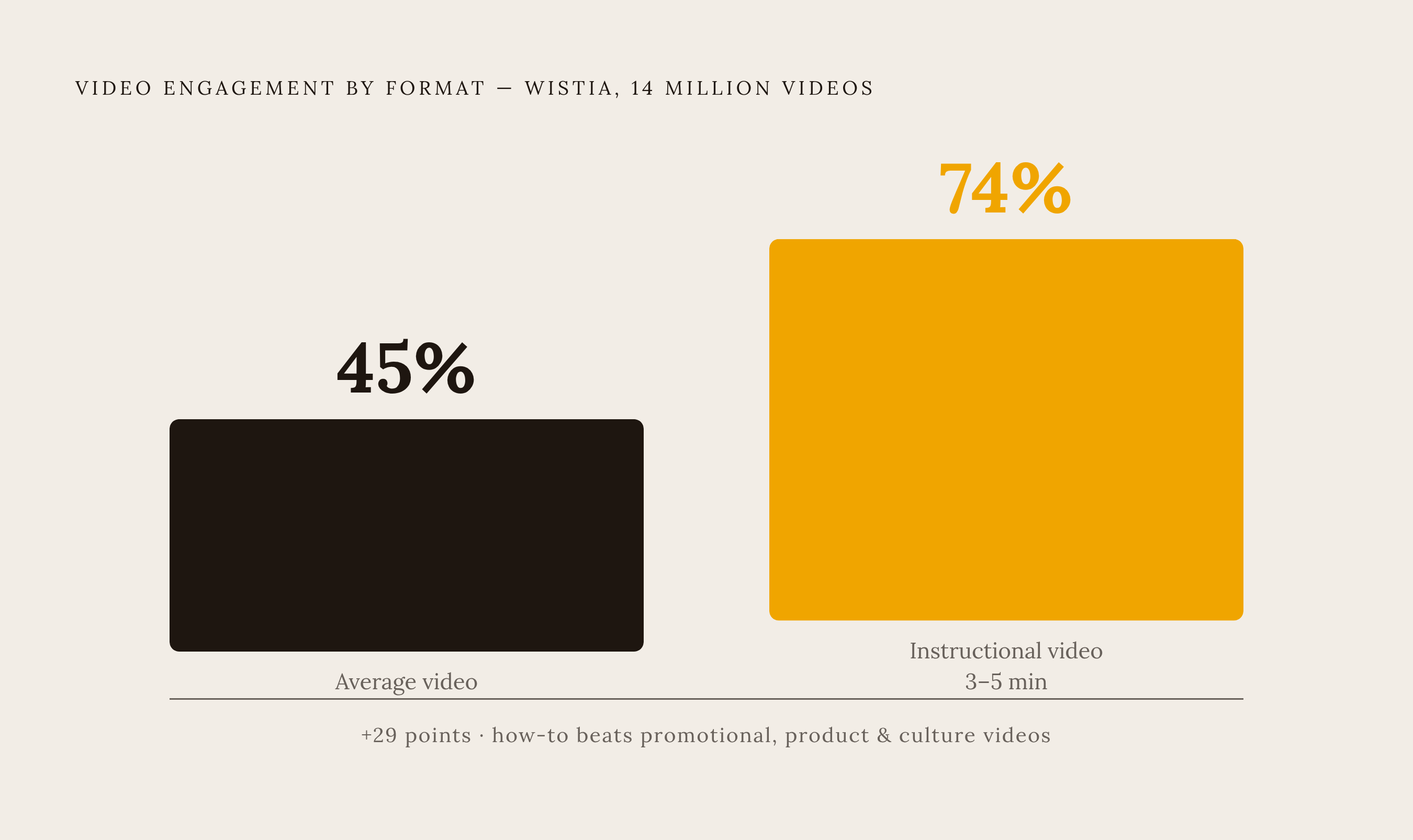
Wistia looked at 14 million videos for this. Instructional videos hold 74% average engagement in the 3 to 5 minute range, against a 45% average for video generally. That gap is not small. How-to content keeps people watching past two-thirds of the runtime even when it creeps up toward five minutes, and it beats promotional videos, product videos, and culture videos by a wide margin.
Shorter clips still win on the engagement-rate leaderboard, though: 50% for anything under a minute, 46% for one to three minutes, 45% for three to five. Chase that number hard enough, and you'll cut everything down into bite-size pieces that don't teach anyone much. A 45-minute API walkthrough watched 40% through has taught someone more than a 90-second clip watched start to finish ever could. Engagement rate tells you how much of a video got finished. It says nothing about whether someone walked away with working OAuth or a Docker Compose file that actually builds. For technical video, total watch time is the number that matters. Let the job decide the length. A metric built for a completely different kind of video cannot make that call for you.
Screencasts and plain command-line interface (CLI) walkthroughs punch above their weight for a related reason: they're cheap to make, and developers trust them more than glossy production. Glossy usually reads as budget spent on style instead of substance, and developers spot that from a mile off.
YouTube: Search, Recommendations, and AI Visibility
YouTube is a search engine before it's anything else. Someone types "how to authenticate with OAuth" or "Docker compose explained," and video results show up because that kind of query is basically begging for a screen recording. A channel that keeps answering these questions earns you traffic on old videos years after publishing. That compounding effect is the actual game here, and it doesn't get talked about nearly enough.
The recommendation system changed in late 2024 to weigh engagement velocity, meaning how fast a video gets watched and reacted to right after it goes live, instead of raw watch time over its lifetime. A strong first ten seconds matters just as much for a REST API walkthrough as it does for a prank video now. Fair or not, that's the mechanism.
Chapters do double duty here. Inside YouTube, they let someone skip straight to the config step instead of scrubbing through 20 minutes of setup. Outside YouTube, Google shows chapter markers directly in search results, which pulls in clicks from people who never opened YouTube in the first place. Add captions and a clean transcript and you've built a page's worth of indexable text around a video that used to be invisible to crawlers. Captioned video use has climbed hard over the past few years. For technical content, an accurate transcript does SEO work while you sleep.
There's a newer layer on top of all this. Between YouTube search, Google's AI Overviews (AI-generated summaries shown at the top of search results), and tools like ChatGPT and Perplexity that summarize and cite sources, a well-made tutorial can end up quoted inside an AI-generated answer. Titles matter enormously here, maybe more than they used to. "How to reduce cloud storage costs without sacrificing performance" reads like the exact question someone typed into a search bar, so it's far more likely to get pulled into an AI answer than "Product Update: Storage Tier v4," a title written for a release calendar rather than a human with a problem to solve.
One Recording, Many Formats
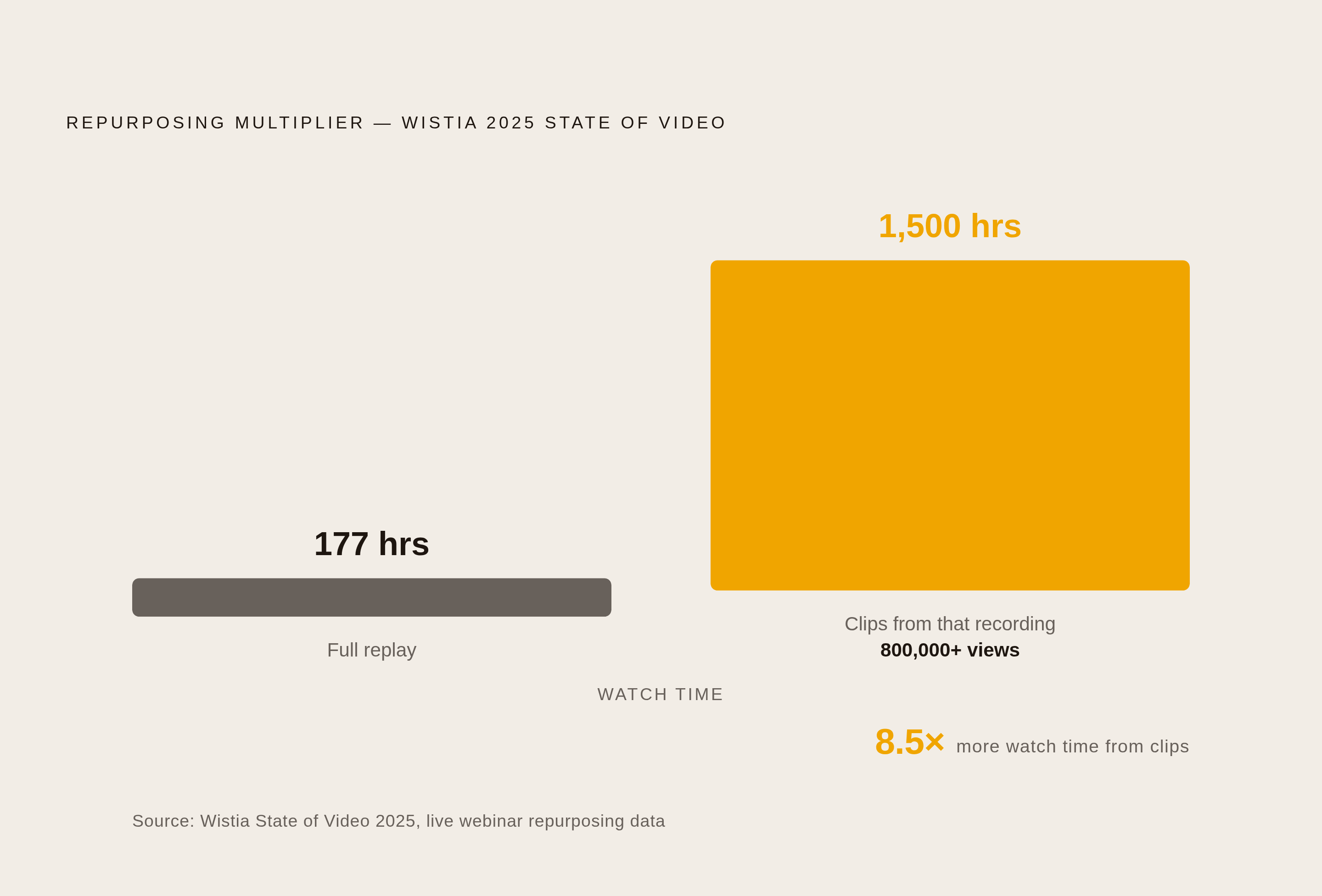
Wistia's 2025 State of Video live webinar makes the case better than any framework could. The full replay pulled 177 hours of watch time. Clips cut from that same recording pulled over 800,000 views and 1,500 hours of watch time, 8.5 times more than the original event. The clips simply met people where they were already scrolling.
Most channels land on roughly 60% long-form (10 minutes or more, which the recommendation engine favors) and 40% Shorts, which handle discovery. One well-built 15-minute tutorial usually cuts into about five Shorts without much extra work. Treat the Shorts as trailers pointing back to the full tutorial. Each one earns its keep without needing its own shoot day.
Over half of teams (57%) spend more time making video than getting it in front of anyone. For developer content, that's an expensive habit, because the audience is out there right now, actively searching for the exact answer sitting unwatched in a video with twelve views. Record once, chop it a dozen different ways, and distribute like it's the actual job. Because it is.
LinkedIn: Where It Fits and Where It Doesn't
LinkedIn has become B2B's top video channel by usage: 81% of teams share video there, just ahead of YouTube's 76%. Ad dollars follow the same pattern. When you pick where to spend on video, LinkedIn usually wins that argument first.
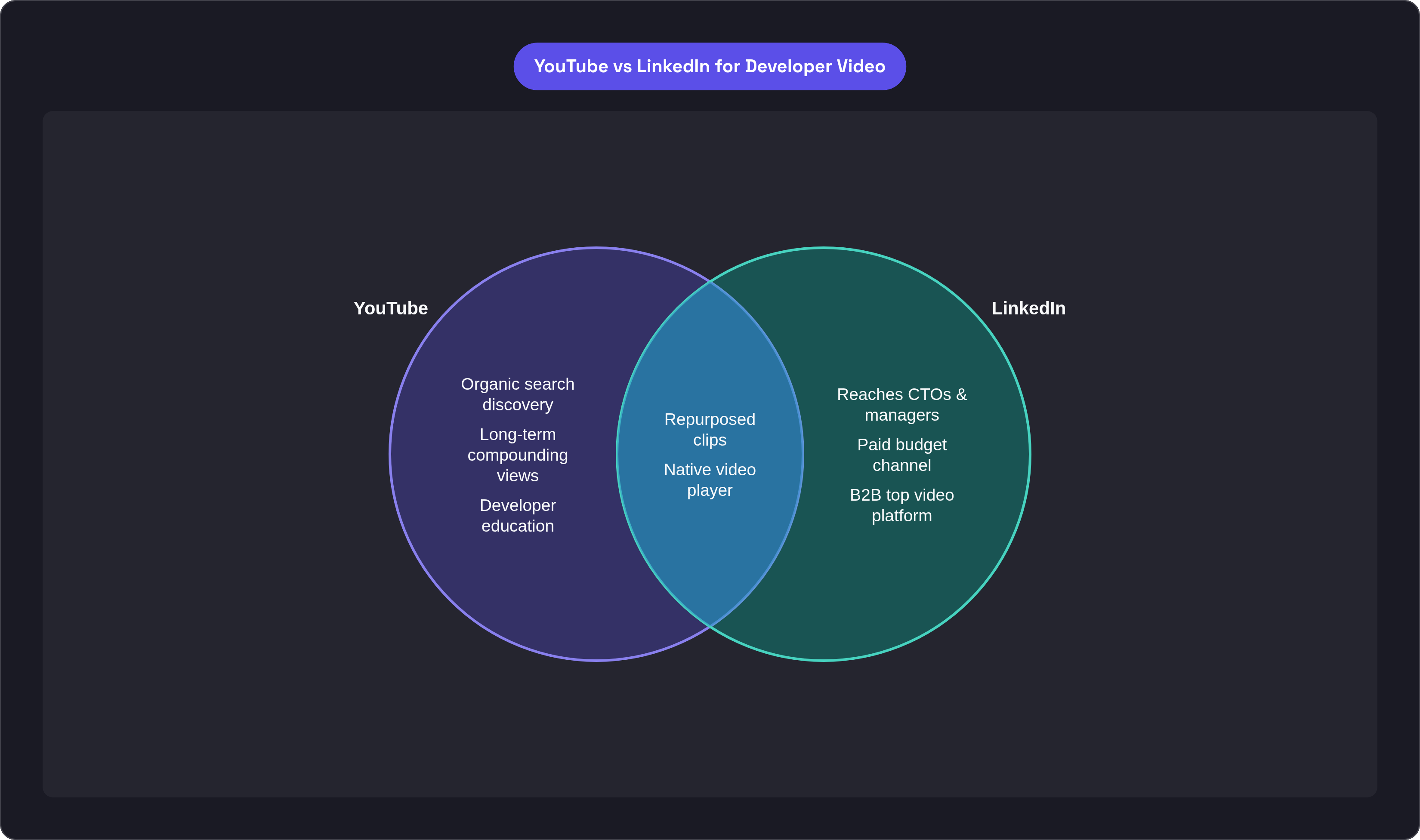
Usage isn't the same thing as discovery power, though. When asked to pick one platform for video distribution, 32% of marketers chose YouTube, 28% chose LinkedIn, and 22% chose Instagram, per Lemonlight's 2025 Video Marketing Landscape Report (500 marketers surveyed). LinkedIn runs a strong second alongside the organic search engine YouTube runs on, and it complements that engine rather than replacing it.
The audience differs in kind, not just size. LinkedIn video reaches engineering managers, CTOs, and whoever signs off on tool purchases, people who may never open a terminal themselves. That's a different job than YouTube's, not a knock on either platform. Organic developer education lives on YouTube because that's where developers go looking. LinkedIn is where you pay to put that same content in front of the person who approves the budget. The clips you built for YouTube's 60/40 split drop straight into LinkedIn's native player with basically zero extra editing, the one genuinely convenient part of this whole arrangement.
Twitch and Discord: Going Deeper With Community
Live coding on Twitch used to be a curiosity. Now it's a real developer subculture with its own norms. The people who show up want to watch someone write actual code, hit a weird error, and think out loud about how to fix it. No algorithm manufactures that kind of self-selected, technically fluent audience. You either have it or you're renting a spotlight nobody's watching.
Twitch fits open-source build sessions, live demos inside a real and messy codebase, and developer advocates who just show up and code in public. The format itself is the trust signal. Nobody expects a lighting kit, and if you bring one, that's almost a red flag.
Most live coders don't let the conversation die when the stream ends. They push it into Discord, where questions keep coming and code snippets keep getting shared for days afterward. Treat Twitch and Discord as one loop, not two channels competing for the same content. Discord's Stage Channels now support live video and screen sharing directly, so a team with an active community there can stream without asking anyone to leave the app they already live in.
Neither Twitch nor Discord bring in people who've never heard of your tool. They're for going deeper with developers who already know you exist. Put them later in the sequence, not at the top of it.
Content That Earns Credibility vs. Kills It
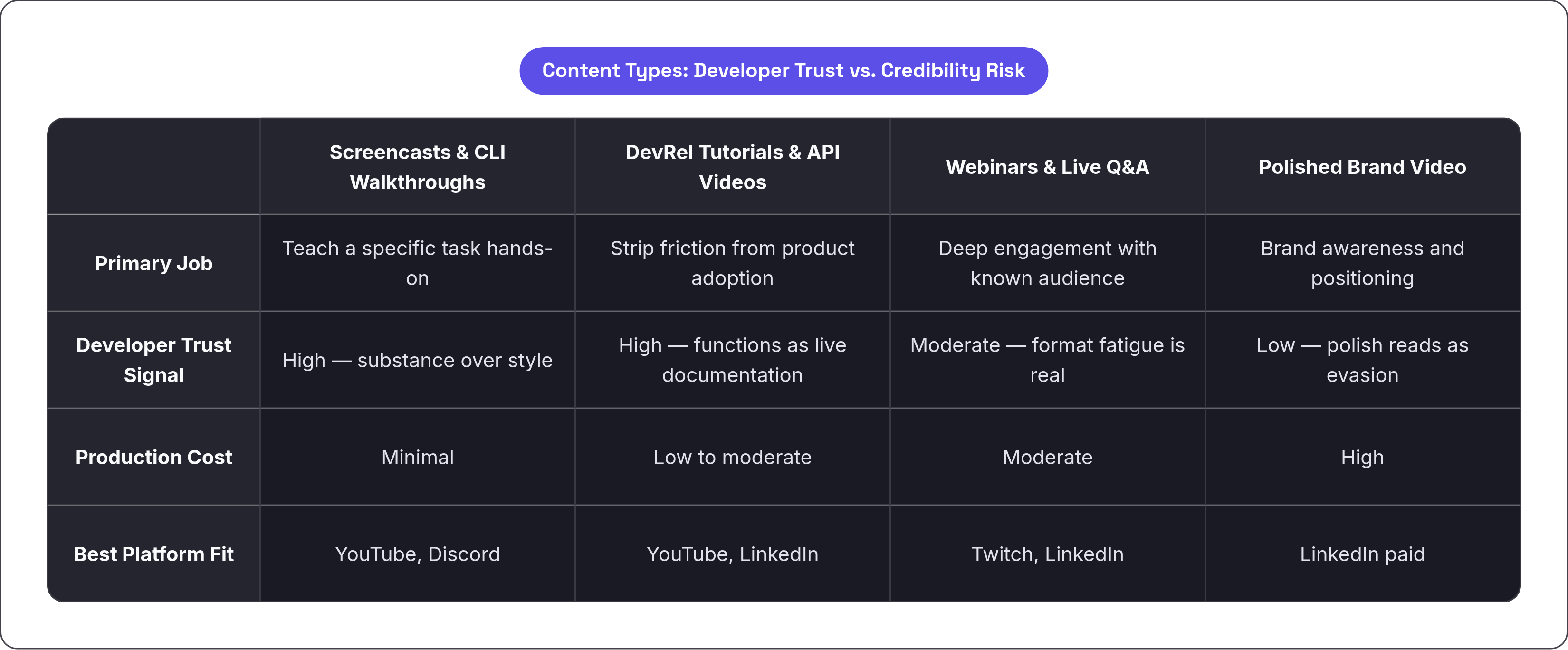
Screencasts and CLI walkthroughs sit in a strange sweet spot. Cheapest thing to make, highest trust earned, and nobody's docking points because the terminal theme is still the default one that shipped with the OS.
Product demos and webinars are among the most commonly produced video types, and businesses rate them highly for business impact. Six in ten businesses ran a webinar last year, and 30% run them at least monthly. That format isn't dying anytime soon, whatever its reputation for being boring.
DevRel tutorials and API reference videos function as documentation that happens to move and talk. They're built to strip friction out of the exact moment someone tries to use the product for real. Short vertical clips work differently: they're discovery hooks. Trim a screencast to one concept under a minute, post it as a Short, and it becomes a doorway back to the full tutorial, earning its place without a production cycle of its own.
What kills credibility fast is polished brand video that hides the actual technical detail behind cinematic transitions and stock footage of hands typing on laptops that clearly aren't running any real code. Developers read that kind of polish as a sign the content wasn't built for them, and they're usually right. Interactive formats, live Q&A, and coding challenges land better with younger developers per the 2025 Stack Overflow survey, which matters more each year as the audience skews that direction.
What Your Budget Actually Allows Now
Nearly 40% of companies spent very little on video production last year. That number alone should kill any idea that developer video needs a studio budget. A screencast-first approach matches how most teams are already spending, no compromise required.
The real barriers are structural: company size and resources, cost, and technical capability, per Wistia's 2025 State of Video Report. None of those hit a screencast anywhere near as hard as they hit a produced brand video with actors, sets, and a shot list somebody had to write and get approved.
AI tools have quietly rewritten the math here. In Lemonlight's 2025 research, 84% of the 500 marketers surveyed used AI somewhere in video production, mostly for captions, transcripts, social clip cutting, and script drafting. That solves the discoverability problem almost by accident: the same tooling that makes captions cheap makes your video indexable by Google and quotable by an AI answer engine. About 40% of teams plan to spend more on video this year, but most are holding budgets flat. Your real gains come from repurposing what's already been shot rather than shooting more of it.
How the Platforms Connect Into One Motion
YouTube anchors everything. It's where organic search discovery happens, where a video keeps earning views years after upload, where AI tools go to find something worth citing, and it's the source file for every other channel downstream. Nothing else on this list works without it standing there first.
Shorts and repurposed LinkedIn clips are amplifiers cut from that anchor recording, each one riding on footage that's already been shot once. Twitch and Discord come into play once there's a real community to go deeper with; using them to introduce your product to strangers wastes the format entirely. LinkedIn's paid budget puts those same clips in front of the buying committee. That developer is already watching on YouTube, unpaid, because they searched for it themselves.
In practice, here's what you do: record one solid, thorough tutorial. Chapter it for YouTube search. Cut Shorts from it for discovery, and add a clean transcript so search engines and AI tools can index it. Push clips to LinkedIn and Discord. Stream a live variation on Twitch once you have a community ready for it.
Standard video marketing logic runs backward from all this. It starts with brand awareness and hopes that turns into product interest somewhere down the line. Developer video starts instead with the question someone's actually typing into a search bar at midnight, and builds outward from that one specific, unglamorous, very real problem.

