Building a Video Content Calendar on a Startup Budget
Plan your calendar around business goals and buyer stages, not just upload dates.

Summary
Plan your calendar around business goals and buyer stages, not just upload dates.
93% of businesses use video in their marketing now, and 87% of marketers say it's directly boosted sales, so consider the argument settled. Now here's the actual problem sitting on your desk on a Monday morning: how do you keep making video every single week without hiring a production team or setting your runway on fire to do it.
What a video content calendar actually does — and what it is not
Ask most people what a content calendar looks like and they'll describe upload dates with titles next to them. I've watched three different startups build exactly that, then sit around four months later wondering why nobody could explain what any of the videos were actually for, a nice-looking calendar with zero idea what it was doing.
A real one connects every video to three things: a business goal, a stage in the buyer's journey, and an actual production slot on someone's actual schedule. Skip any one of those and congratulations, you've built a to-do list with delusions of grandeur.
The calendar is the skeleton, not the muscle. It lines up your output with how someone moves from "never heard of you" to "here's my card." It forces production in order (script, then shoot, then edit, then publish) instead of everyone scrambling the night before a post is due. Repurposing gets planned before the camera turns on, too, not stitched together in a panic after someone remembers the company technically has a LinkedIn page.
HubSpot's data backs up the obvious: marketers who plan their content in advance report better results than those who don't. Same reason meal-prepping on Sunday beats standing in front of an open fridge at 9pm negotiating with a block of cheese.
Worth remembering: the calendar sits upstream of the camera, and it's a planning document that lives or dies on whether people actually open it. A scheduler just executes what's already decided, and that part's easy by comparison.
What startups actually spend on video — and where the money goes
According to G2, nearly 40% of companies spent under $5,000 on video production last year. So if you're bootstrapped and feeling behind, you're standing with the majority, not off sulking in some corner by yourself.
Most teams aren't outsourcing either. 59% of marketers make video in-house, and another 32% blend in-house work with outside help. Handing the whole thing to an agency is the minority move here, not the default.
For a pre-seed company, $2,000 to $8,000 covers a reasonable total video budget. Before anything with a crane shot or a boom operator, the first priority is a 60 to 90 second explainer or product demo. That one video does more commercial work than five polished brand pieces nobody outside the company will ever watch.
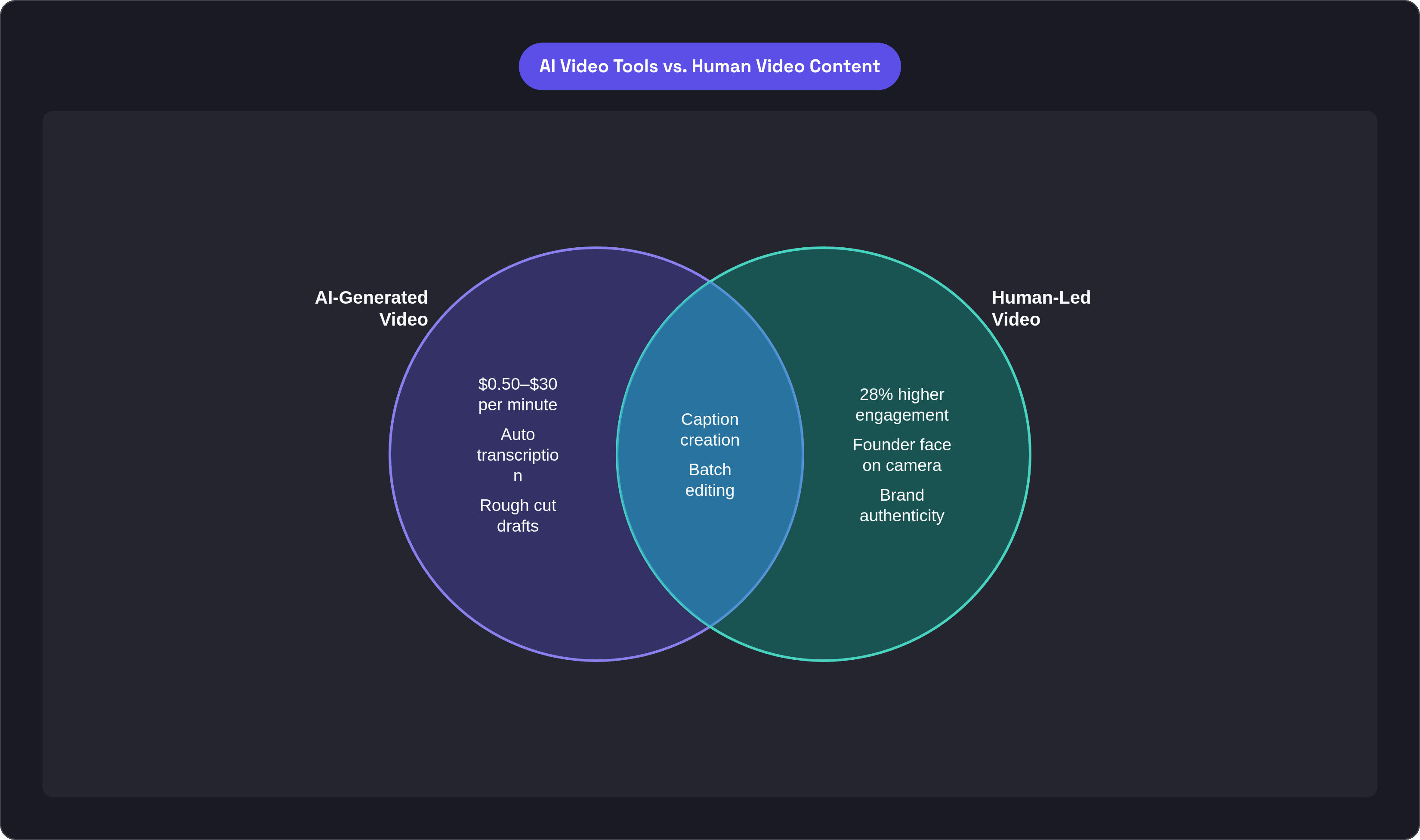
AI has genuinely changed the math here. AI video generation runs roughly $0.50 to $30 per minute against $1,000 to $5,000 per minute for traditional freelance production. Teams using these tools save around 14 hours and up to $1,500 per project, which is a hire you didn't have to make.
One catch: authentic human video still beats AI-generated content by 28% on engagement. AI handles the boring parts well (transcribing, rough cuts, caption drafts), but it's an assist, not a replacement for the founder's actual face on camera. Lean on it too hard and your brand starts to feel like the lights are on but nobody's home.
Once the real numbers are sitting in front of you, you stop cutting corners at random and start making trade-offs on purpose instead.
Laying the strategic foundation before touching the calendar
Here's the failure mode that kills more video programs than bad lighting ever will: filling calendar slots before deciding what the company should actually be known for. Output without direction burns your cash and time at roughly the same rate, and neither comes back once it's gone.
Start with content pillars, two to four themes your company wants to own, no more. Every video maps to one of them, no exceptions. If an idea doesn't fit a pillar, it doesn't make the calendar, no matter how sharp it seemed at 11pm the night before.
Pick two or three channels and stay there. For a B2B startup, LinkedIn plus YouTube usually does the job, or short-form social paired with a landing-page anchor video. Spread your team across five platforms and you'll end up mediocre everywhere instead of actually good at one thing.
You don't need a keyword tool for topics, either: sales calls, support tickets, onboarding conversations, competitor reviews. That's a free, constantly refreshing bank of what customers actually care about, and someone on your team had one of these conversations this week, so go ask them what came up.
Tag every slot by funnel stage: top, middle, bottom. Skip that step and you'll end up with twelve videos doing the exact same job while nobody ever makes the one that actually closes a deal.
And be straight with yourself about cadence. Commit to a schedule you can hold for twelve straight weeks, not a four-week sprint that looks gorgeous in the planning doc and dies the moment someone catches the flu or a client emergency eats the afternoon.
Choosing the right formats for a small team's production capacity
Short-form is the anchor format, and the numbers back it up hard. Recent data shows videos under 60 seconds get 2.5 times more engagement per impression than other content types, and Wistia's State of Video puts average engagement at roughly 50% for sub-minute clips against 17% for anything over an hour.
Two numbers should shape every format decision you make. 85% of video gets watched with sound off, so captions belong at the start of your production checklist, not the wish list. And 75% of views happen on mobile, which means vertical or square framing is the default, not something you fix later when you remember.
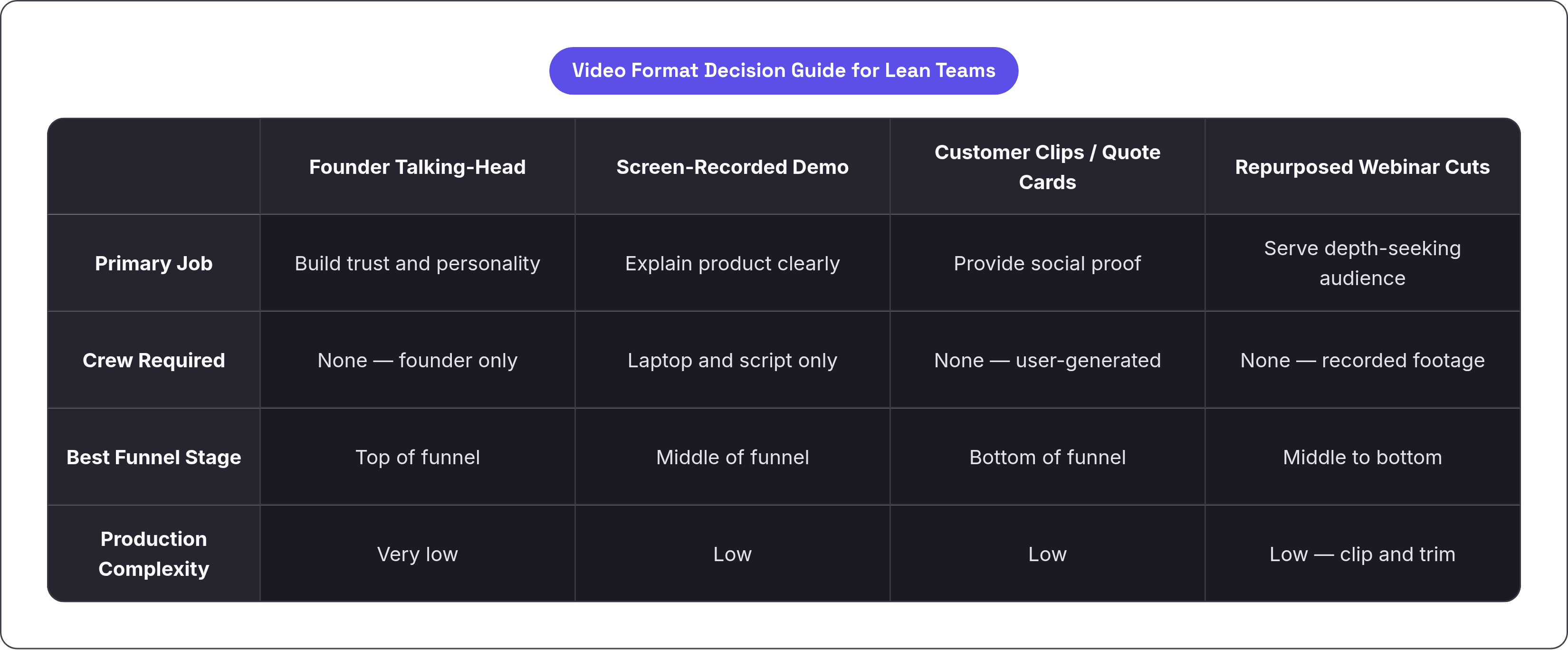
Think of format as a decision tree: a founder talking-head for trust and personality, a screen-recorded demo for product explanation (a laptop, a script, no crew required), customer clips or quote cards for social proof, and repurposed webinar cuts for the audience that actually wants depth.
Live-action and animation solve different problems, too. Live-action builds a personal connection and, at founder scale, costs almost nothing but time. Animation handles complicated product explanations without worrying about lighting, location, or whether the dog decides to bark mid-take. Most lean teams need both, just not in equal amounts.
Format is a resource decision before it's a creative one. Pick what your team can actually produce again and again, not what looks best in the mood board.
The gear and tools a lean team actually needs
Your phone is a camera crew now, and a current iPhone or Samsung Galaxy shooting 4K is a legitimate production tool, full stop. Want a step up? Entry-level mirrorless cameras like the Sony ZV-E10 or Canon EOS M50 get you there without touching broadcast-level spending.
Audio matters more than people expect going in. A lapel mic is probably the single highest-impact purchase a startup makes for video, because viewers forgive shaky footage far more readily than garbled sound. Nobody has ever closed a deal because the background blur looked nice.
For editing, DaVinci Resolve's free tier handles color correction and audio cleanup at a genuinely professional level. Shotcut and Audacity round out a toolkit that costs exactly nothing, so "we can't afford editing software" stopped being a real excuse a while ago.
Layer AI tools on top for speed. Something like OpusClip pulls clips automatically from a longer recording, and a full workflow covering scripting, captioning, and rough cuts can run under $100 a month. Budget $50 to $100 monthly early on, scaling to $200 to $500 as things grow.
The decision that matters more than any single gear purchase: lock in a repeatable setup. Use the same room, same mic position, and same lighting rig every time. That's the difference between filming in five minutes and spending half an hour hunting for the tripod.
Batch production: how a single afternoon fills weeks of calendar slots
Filming one video at a time is expensive in a way that never shows up on an invoice. Every session eats 30 to 60 minutes of setup, warm-up, and mental context-switching before anyone says "action." Do that five times a week and half your day is gone to overhead nobody budgeted for.
Batching kills that waste. Batch workflows, combined with AI-assisted editing, meaningfully cut per-video production time compared to daily just-in-time filming. That's the gap between video being sustainable and video being the thing everyone quietly dreads on the calendar.
A single dedicated batch session can produce a substantial number of short raw recordings. Run those through AI clipping and a quality pass, and one afternoon covers two to three weeks of posting at a sustainable pace.
The output advantage compounds quickly: teams that batch produce significantly more content per week than teams filming daily, and the math isn't subtle.
Batching fixes a quality problem too, one people rarely talk about. Whoever's on camera is warmed up and loose by take three, instead of stiff and over-rehearsed the way people get when filming cold, once, under pressure, for the one video due that afternoon.
This changes how the calendar gets built, structurally. Batch sessions become the fixed dates you plan around instead of individual deadlines scattered across the month. The session, not the video, is the actual unit of planning now.
Repurposing as a multiplier: turning one piece of content into many
Plan the repurposing map before you film, not after. If you already know a 20-minute founder interview needs to yield eight or nine shorter pieces, shoot it differently: leave pauses, restate key points, and give your editor something to actually work with instead of hoping they find gold in forty minutes of rambling.
One founder interview or product walkthrough becomes a full YouTube video, short-form clips for LinkedIn or Reels, a quote card, and a caption-led post. One shoot, multiple pieces sitting on the calendar.
The same raw footage gets cut differently depending on funnel stage, too: a hook-driven clip for top-of-funnel awareness, a feature breakdown for the middle, a proof-point cut for the bottom where someone's already comparing you to a competitor and needs a reason to pick you instead. Same shoot, three completely different jobs.
Vertical crops, caption burn-ins, length trims, platform formatting generally, all of it gets handled in one pass rather than piecemeal every time someone remembers a new channel exists.
Every major production on the calendar should list its derivative assets right next to it, because if those derivatives aren't written down, they usually just don't happen. Good intentions don't survive a busy week the way a calendar entry does.
Building the actual calendar: fields, cadence, and the weekly rhythm
Keep the fields simple: title or topic, content pillar, funnel stage, primary channel, production status, scheduled publish date, repurposed assets. That's seven fields, and that's the whole system.
You don't need dedicated software for this. A shared spreadsheet works fine, and so does the free tier of Notion or Airtable. The tool matters far less than whether anyone actually opens it Monday morning, which, let's be honest, is the part everyone underestimates.
A workable weekly rhythm for a small team looks like this: one fixed batch filming block per month, a weekly pass to edit and schedule what's ready, and a short review of last week's published videos before scripting the next batch. That's the whole loop, and it just repeats.
A defensible starting cadence is one to two short-form posts a week plus one longer anchor video a month, more ambitious than doing nothing, achievable without hiring a video team, exactly where a lean startup should sit.
The review step is the first thing people skip when things get busy, and it's the one that isn't optional. Checking which videos actually drove leads, demo requests, or replies is what ties the calendar back to the business goals it's supposed to serve. Skip it and you're just producing content into the void, hoping something sticks.
Keep at least two weeks of finished, scheduled content sitting ahead of today's date at all times. Weeks happen where filming just isn't possible, whether someone's out sick or a client fire needs putting out. The buffer is what keeps the calendar from going dark when life does what life does.
Keeping the system running: what breaks lean video programs and how to prevent it
The collapse pattern shows up over and over. A team plans 15 videos for the quarter, delivers five, and quietly stops mentioning video at all. The calendar wasn't wrong, exactly; it was never grounded in the hours the team actually had to give it.
Before scheduling a single quarter, map the real hours available for scripting, filming, editing, and review. Build the calendar around that number. Don't aim for an ideal volume that looked great in a strategy meeting but ignores the fact that everyone also has a full-time job.
If videos keep going out and generating no engagement and no pipeline movement, the problem is almost never frequency; it's format, or it's topic. Fix the pillar or the format before adding more output, because more of the wrong thing is still the wrong thing, just louder now.
Protect what works. A video that's genuinely driving traffic or generating real leads doesn't get retired just because you're bored of looking at it. Change it when there's actual evidence something better exists to replace it, not before.
AI tools and automated scheduling speed things up, no argument there, but strategy resets, topic pivots, and decisions about how the brand shows up on camera need a human sign-off. The system exists to serve the team's judgment, not to quietly replace it while nobody's watching.
Consistency across four straight quarters builds more real authority than one expensive, high-production video that never gets a sequel. That means authority in search rankings and in how AI tools answer questions about your space. Steady wins here, almost every time it's tried.


