One Shoot, Every Format: The Video Repurposing Playbook
Multiply your video's reach by adapting one shoot across every platform's specifications.

Summary
Multiply your video's reach by adapting one shoot across every platform's specifications.
Video was projected to account for the vast majority of all internet traffic by 2025. It has become the default medium. Wyzowl's 2026 data puts nearly all businesses using video as a marketing tool, back at an all-time high.
Short-form moved faster than most people were ready for. A Q1 2025 study from NuVoodoo Media Services, surveying over 2,900 U.S. consumers, found more than 90% of Gen Z and Millennials watching short-form video on YouTube, TikTok, and Facebook. Gen X is close behind. More than half of Boomers too. This spans every platform and every age group.
Which creates one very practical problem: a shoot that only feeds one platform leaves most of that audience untouched.
The 2025 B2B Content Marketing benchmarks from the Content Marketing Institute, pulling from 980 respondents globally, make this concrete. 76% of B2B marketers used video. But 92% used short articles and posts, and 69% used long-form articles. Successful content programs are multi-format by design. So the real question is this: is your video production built to feed a multi-format system, or are you just cranking out one asset at a time and calling it a strategy?
One Shoot, Thirty Assets: The ROI Case for Repurposing
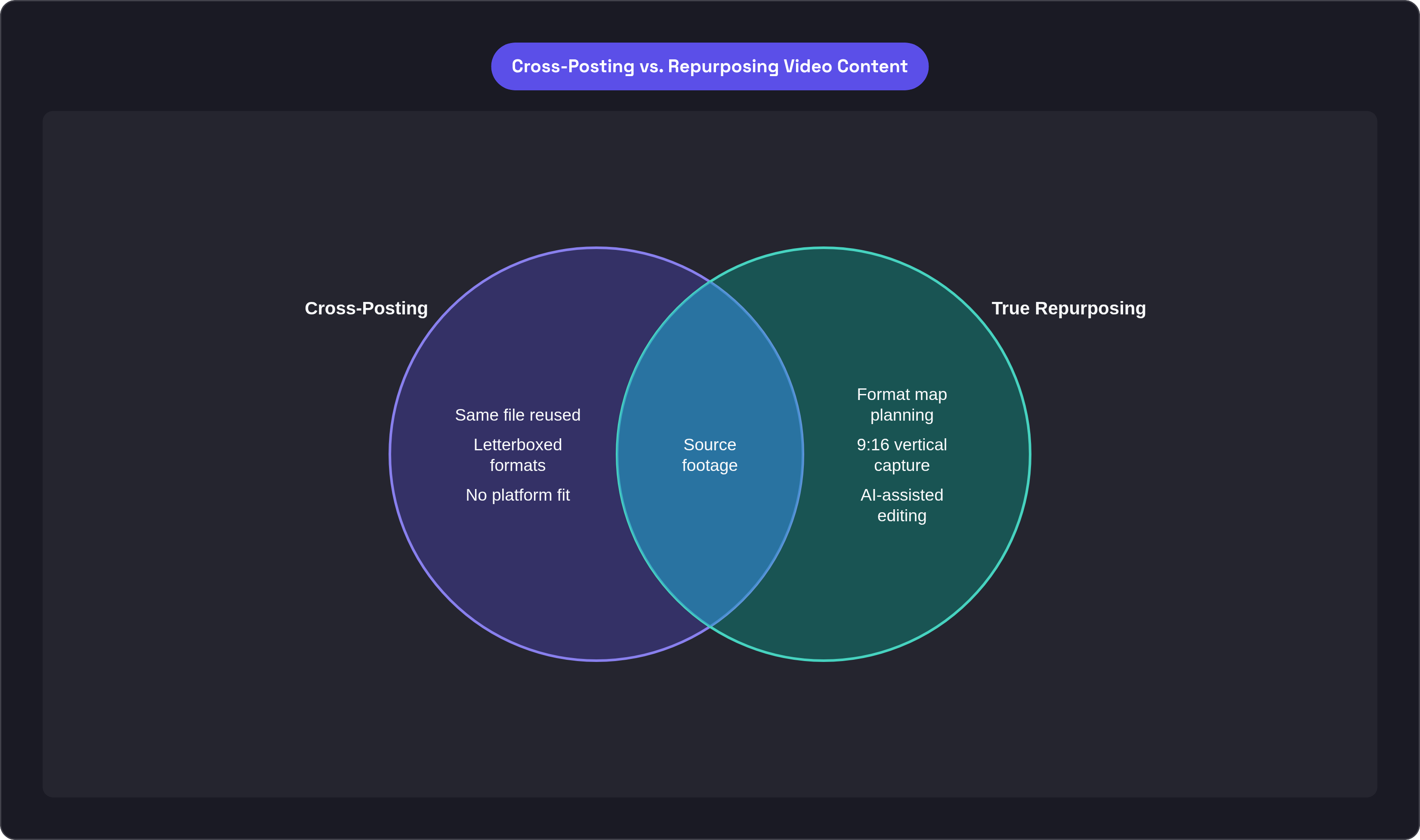
Most teams treat repurposing as a cleanup job. You finish the video, trim it, drop it somewhere else. The result is a horizontal YouTube cut letterboxed into a TikTok frame, or a 45-minute conference recording dumped onto LinkedIn with the caption "great session!" That is cross-posting, and it differs fundamentally from repurposing.
Cross-posting means the same file goes to a different platform. Repurposing means the same raw material gets rebuilt into something that actually belongs on each platform. Different message angle. Different length. Different framing. The gap between those two approaches explains why most repurposing underperforms.
The ROI math on doing it properly is compelling. Repurposing strategies improve ROI by 32% on average, according to Ranktracker's 2025 analysis. And that number assumes the repurposed content is actually adapted to each platform, not just re-posted. Repurposing also saves 60 to 80% of content creation time compared to building from scratch per platform, per CloudPresent's 2025 figures. Across a full quarter's output, that compounds fast enough to matter at a budget level.
Here is a specific case. Webinar highlight clips achieve significantly higher lead conversion than full-length replays, per MConverter's 2025 data. The shorter derivative format outperforms the source material on the metric that matters most for B2B teams. The clip beats the recording it came from.
Over half of companies already repurpose video into social clips. LinkedIn is the top destination at 67%, followed by Instagram, YouTube, and Facebook, according to G2's 2026 data. This is mainstream behavior now. The bar for doing it well has risen because of it.
And then there is this from Goldcast's 2025 Webinar Benchmark Report: 131,296 video clips created via repurposing, representing a 2,903% increase. That volume does not happen with manual workflows. More on what made it possible in a moment.
Plan Your Formats Before You Ever Hit Record
The discipline that separates teams who repurpose well from everyone else is simple, but almost never actually practiced: decide which formats you're filming in before the shoot so your editor isn't left wondering why the footage will not crop vertically without cutting someone's face clean off.
Start by listing every distribution destination.
YouTube long-form
A 60 to 90-second LinkedIn clip
An Instagram Reel
An email embed
A silent loop for the website homepage
Write them all down. Then work backward to what each one actually needs from the raw footage.
Long-form YouTube needs narrative arc, b-roll coverage, and room to breathe. A LinkedIn clip needs a single standalone point that opens with a hook in the first three seconds. A silent website loop needs action that reads without audio at all. A Reel needs vertical framing that was captured vertically, not cropped from a horizontal shot after the fact.
Once the format map exists, the shot list mostly writes itself. You know you need critical scenes covered in both 16:9 and 9:16. You know you need isolated product detail inserts. You know to flag soundbites during the shoot so they can be pulled later without guesswork.
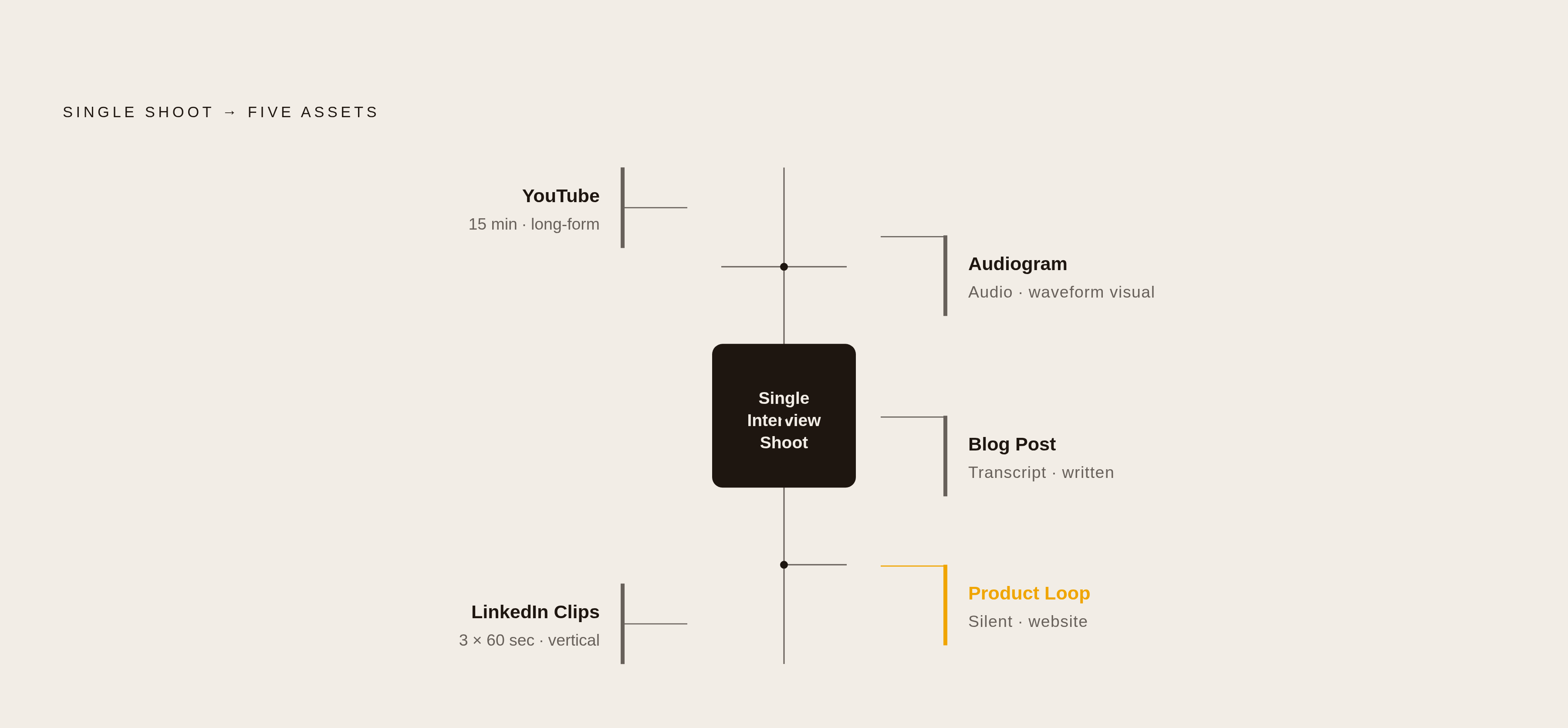
In practice, one interview shoot can produce a 15-minute YouTube piece, three 60-second LinkedIn clips, an audiogram (an audio clip paired with a static visual, formatted for podcast or social feeds), a blog post from the transcript, and a silent product loop for the website. All from the same day. All planned before anyone walked on set.
The alternative is editing repurposed cuts from footage that was never designed for them. Compromised crops. Missing close-ups. Horizontal footage that physically cannot fill a vertical frame without distorting. That is a pre-production planning failure. It just shows up as a post-production problem.
What Each Platform Demands and Why It Matters
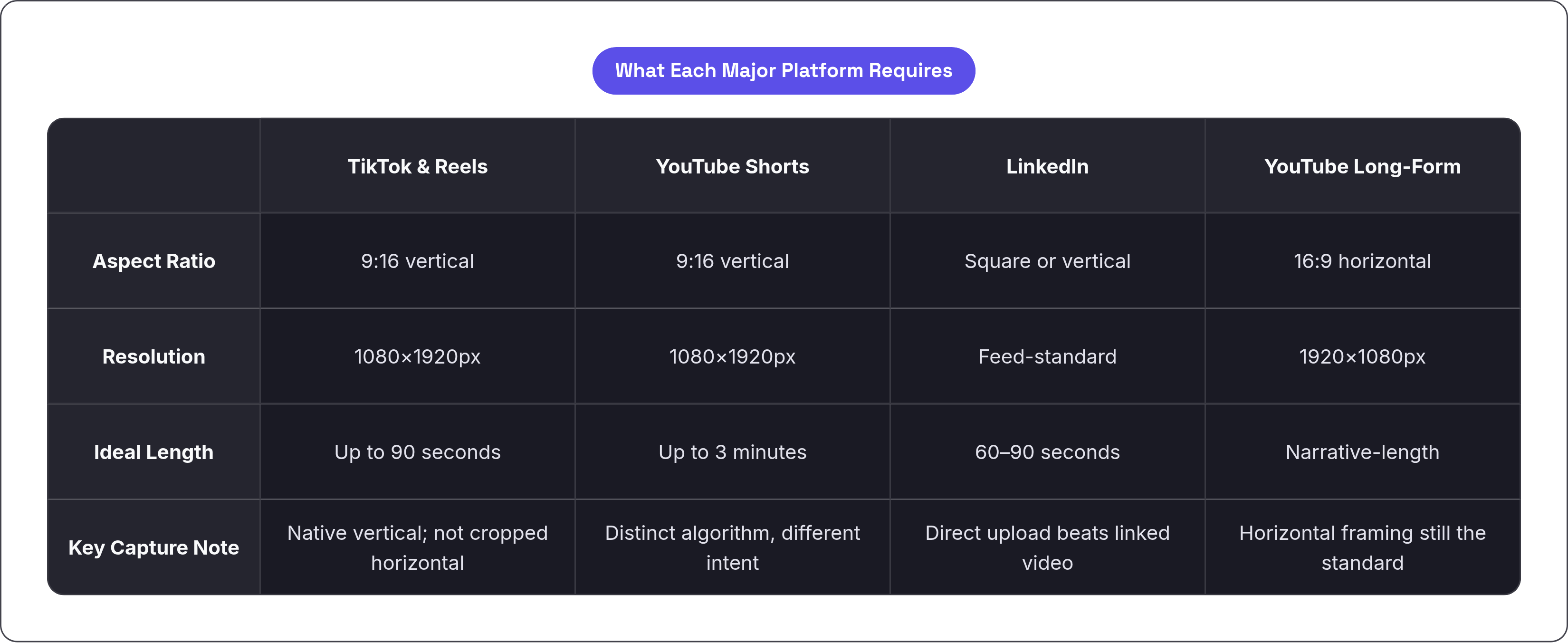
Three aspect ratios drive nearly every modern distribution decision: 16:9 for YouTube long-form and landscape placements, 1:1 for feed-safe square formats, and 9:16 for TikTok, Reels, Stories, and YouTube Shorts, per Sendible's 2026 platform guidance.
Vertical video in 9:16 occupies 300% more screen space on mobile than widescreen 16:9, which drives meaningfully higher click-through rates according to Koro's 2026 data. That is a structural attention advantage built into how phones work.
Here is how the specs break down:
TikTok and Instagram Reels: 9:16, 1080x1920px; Reels supports up to 90 seconds; TikTok rewards native vertical capture, not cropped horizontal footage
YouTube Shorts: 9:16, 1080x1920, up to 3 minutes; same spec family as Reels and TikTok but a distinct algorithm and a very different audience intent
LinkedIn: professional-context mindset; 60 to 90 seconds performs well; square or vertical formats work in the feed; direct upload consistently outperforms linked external video
YouTube long-form: 16:9, 1920x1080; the one context where horizontal framing is still the clear standard
One production note that changes a lot downstream: shoot your subjects centered in frame rather than defaulting to rule-of-thirds composition. A centered subject can be safely cropped to both 16:9 and 9:16 without their face disappearing into an edge. You establish that discipline on set. It is not recoverable in post if you skip it, no matter how good your editor is.
Custom exports per platform is the most labor-intensive approach. It also consistently delivers the best results. Most professional multi-platform creators use this workflow because the alternatives produce obvious compromises, and trained eyes catch them immediately.
Captions Are a Production Decision, Not an Afterthought
Up to 85% of Facebook video views happen with sound off, per Digiday data cited in Visualenews's 2025 research. The same muted autoplay default applies on LinkedIn, Instagram, and X. If your video does not work without audio, it does not work for most of the people who will actually encounter it.
Videos with captions generate 40% more average view time than uncaptioned equivalents, according to 3Play Media's 2023 Video Accessibility Report. Platform-specific data reinforces this: captions increased average view time by 12% in Facebook video ads, and YouTube advertisers saw a 15% lift in click-through rates when captions clarified the message to muted viewers.
And yet only 28% of online videos have captions that meet accuracy standards. The other 72% either have none or have auto-generated captions with significant errors, per 3Play Media's 2024 State of Captioning Report. The baseline is low enough that accurate captions function as a genuine competitive advantage.
The accessibility case is real and entirely separate from the marketing argument. 71% of people with disabilities rely on video captions to consume online content, per WebAIM's 2024 data. That is a meaningful portion of any audience.
So here is the actual argument for treating captions as a pre-production decision rather than an editing task. When you plan captions from the start, you mic speakers for clean audio, which dramatically improves auto-caption accuracy. You keep critical on-screen text out of the lower-third safe zone (the bottom portion of the frame where captions appear) so captions do not cover it. You scope multilingual subtitle tracks into the post-production budget before editing begins, rather than scrambling to add them after the cut is locked.
Global brands that added multi-language subtitles saw 20 to 25% growth in international engagement. For any team targeting more than one market, subtitle planning belongs in the pre-production brief as a line item, not a post-launch wish list.
AI Killed the Cost of Derivative Formats
AI-powered tools now save content creators up to 200 hours annually, and 44% of marketers already use AI for video creation, according to OpusClip's analysis of leading platforms. The Goldcast 2025 figures mentioned earlier show what this looks like at volume: 131,296 clips and 94,710 unique text assets created via repurposing, including an 11,464% increase in text derivative assets. That volume is not achievable with manual workflows.
OpusClip has over 10 million users, has generated 172 million clips, and has raised roughly $50 million, including a 2025 SoftBank Vision Fund 2 investment at a reported $215 million valuation.
What AI handles well is the mechanical execution of a format map.
Automated scene detection and clip extraction
Transcript-based soundbite identification
Aspect ratio reformatting
Auto-caption generation as a starting draft
Editorial judgment remains essential and outside AI's current capabilities. Which moment actually earns a standalone clip? Which platform gets which angle? Does this clip hold up without the 30 seconds of context that came before it? Those questions have to be answered in pre-production. AI executes the format map. It does not write one.
The practical model: plan the formats and flag the key moments before the shoot, use AI to execute the derivative cuts and captions in post, and review for platform-specific editorial fit before publishing. That review step is the one you are most likely to shortchange. It is also the one that determines whether the derivative asset actually works or just technically exists.
One format that gets overlooked in most AI repurposing workflows is email. Email campaigns with embedded video see a meaningful average revenue lift per send, per MConverter's 2025 data. AI tools handle clip extraction for email just as easily as they do for social formats. There is no extra lift. It just requires including it in the plan from the start.
The Four-Stage System That Makes It Repeatable
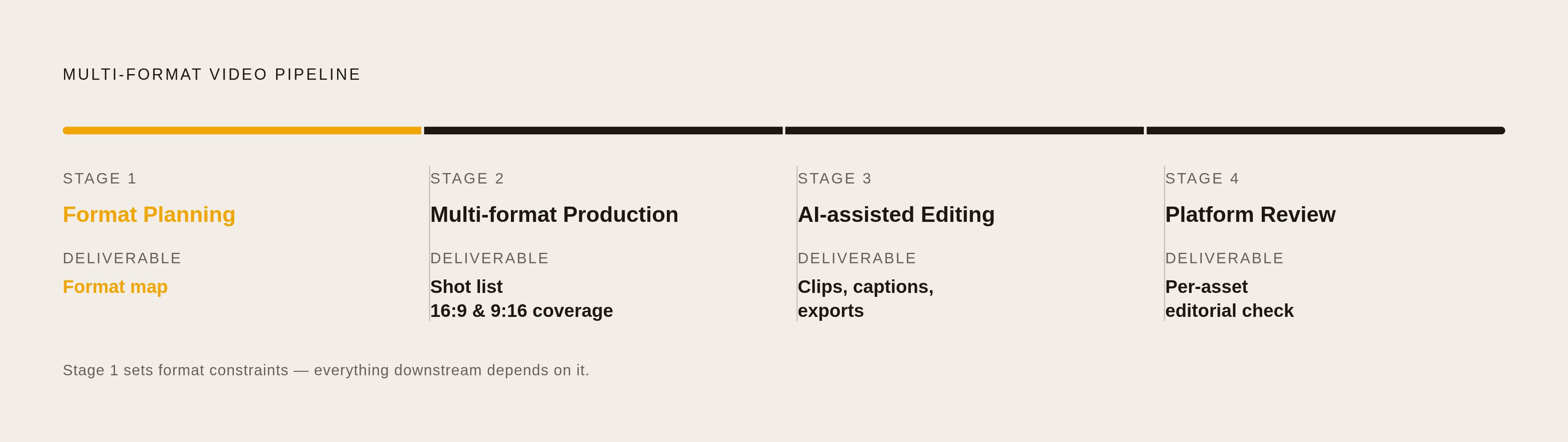
The system has four stages. Each has a clear owner and a concrete output. None are complicated on paper. What makes them hard is doing them in sequence, every time, without skipping the first one because you are already behind schedule.
Stage 1: Format planning before scripting. The deliverable is a format map that lists every destination platform, the message angle for each, the required aspect ratio and duration, and the caption and subtitle scope. This document drives everything that follows. Without it, you are improvising in the edit bay.
Stage 2: Production designed for multi-format capture. The deliverable is a shot list built from the format map. Both 16:9 and 9:16 coverage of every critical scene. Isolated product or detail inserts. Soundbite moments flagged in real time on set. The footage becomes the raw material the format map already accounted for.
Stage 3: AI-assisted derivative editing. AI tools handle transcript extraction, clip cutting to flagged timecodes, aspect ratio exports, and initial caption drafts. Human review catches errors, misattributions, and moments that do not survive being lifted out of context. That review pass is not optional.
Stage 4: Platform-specific review before publishing. Each asset gets checked against its destination's editorial norms. The LinkedIn clip opens with a strong standalone statement. The Reel works muted. The YouTube cut has full context intact. This is a one-time review pass per asset, rather than a full re-edit. It takes far less time than most people assume.
The compounding effect of running this consistently is where the real gains show up. Vertical video delivers 1.5x higher completion rates on mobile compared to horizontal, per MConverter's 2025 data. That payoff only exists if you captured 9:16 footage intentionally. The 60 to 80% time saving accrues at the system level over time, not just on a single video.
A shoot is no longer the production of one video. It is the acquisition of raw material for a content library whose scope you decided before the cameras rolled. That framing changes how you brief the shoot, how you direct on set, and how much you actually get out of the day.


