Using Video to Onboard Developers to Your API
Video reduces API onboarding friction and dramatically accelerates developer conversion.

Summary
Video reduces API onboarding friction and dramatically accelerates developer conversion.
There's one number worth obsessing over: time to first call. TTFC. It's the clock that starts at account creation and stops the moment someone gets a real API response back. Everything downstream — conversion, retention, whether someone keeps building or quietly tabs over to a competitor — all of it is predicted by that single number.
Developers who make their first API call within 10 minutes are three to four times more likely to convert to paid plans. That's not a soft UX win. That's a revenue signal dressed up as a docs problem.
Stripe developers can process a test payment in under three minutes. Working call, three lines of code. Stripe made TTFC almost embarrassingly fast on purpose, and the payoff shows up in the numbers. Moving from a sluggish TTFC to a competitive one often produces a 40 to 60 percent jump in conversion rates. Onboarding isn't a documentation task. It's a revenue decision.
Postman's own experiments show that providing a ready-to-run collection makes developers anywhere from 1.7 to 56 times faster on their first call. The range is wide because starting conditions vary so much. But the direction is clear.
Every video decision that follows comes down to one question: does this shorten time to first call? Yes, keep it. No, cut it.
How developers actually learn APIs — and where video fits into that mix
Two stats that seem to contradict each other but don't. The 2024 Stack Overflow Developer Survey found that technical documentation (84%) and tutorials (68%) are still the dominant learning formats. Industry analysis from that same year found that 78% of developers prefer video tutorials over written documentation when learning new technologies.
Both are true. They just describe different moments in the same process.
Developers use video for discovery and initial orientation. They use text once they already know what they're looking for and need to look something up fast. A 2016 study by Käfer, Kulesz, and Wagner made this explicit: these formats serve different parts of the learning process. Pitting them against each other misses the point.
Here's the more uncomfortable signal. Postman's 2024 report found that 44% of developers dig through source code to understand APIs, and 43% rely on colleagues. Both of those are workarounds. When nearly half your users are pinging a coworker just to figure out your API, that's not community engagement. That's a gap in your documentation doing real work.
Video doesn't solve every documentation problem. But it handles orientation well enough that text can finally do what it was always better suited for anyway: reference material for people who already know roughly what they're doing.
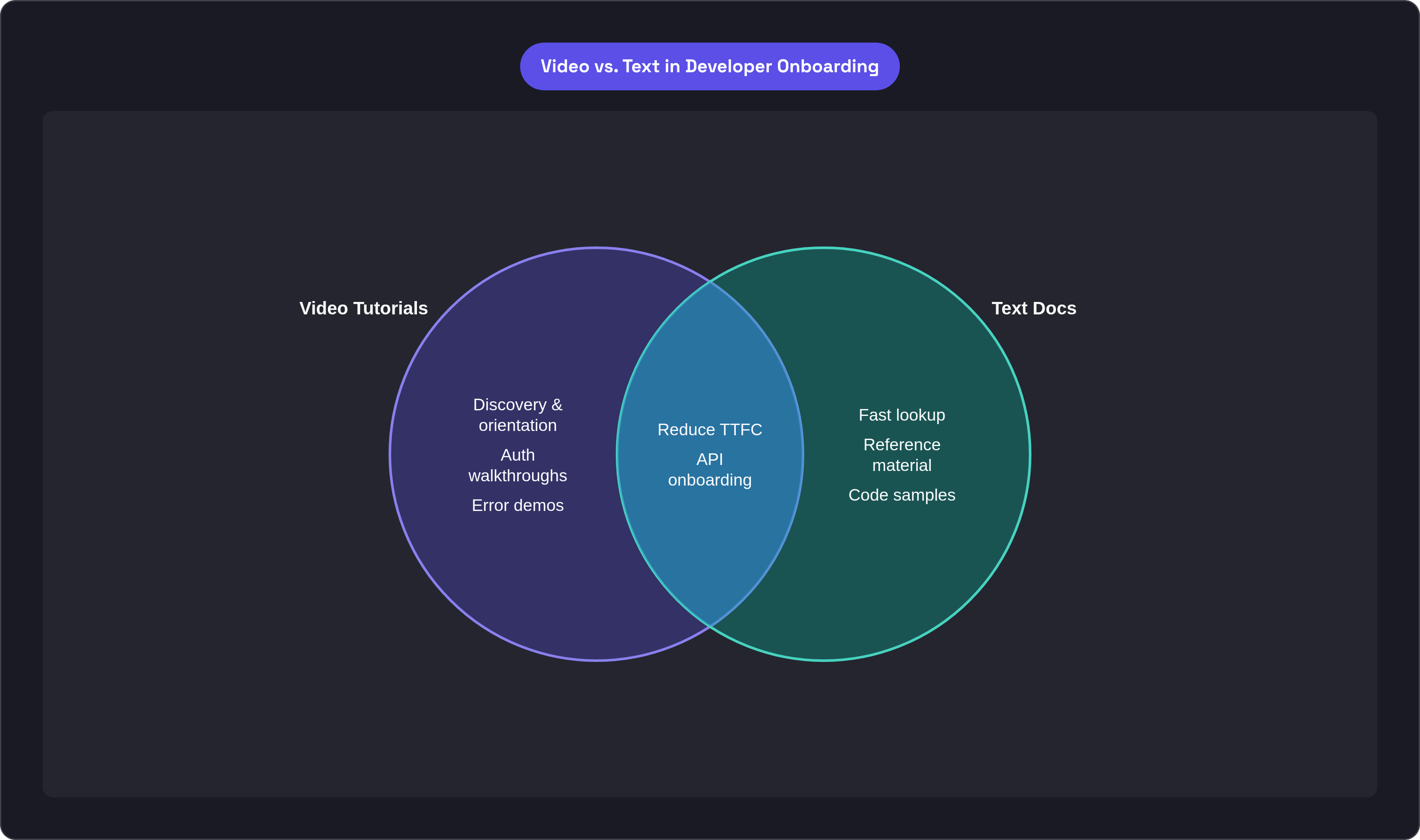
Matching video format to each friction point in the onboarding sequence
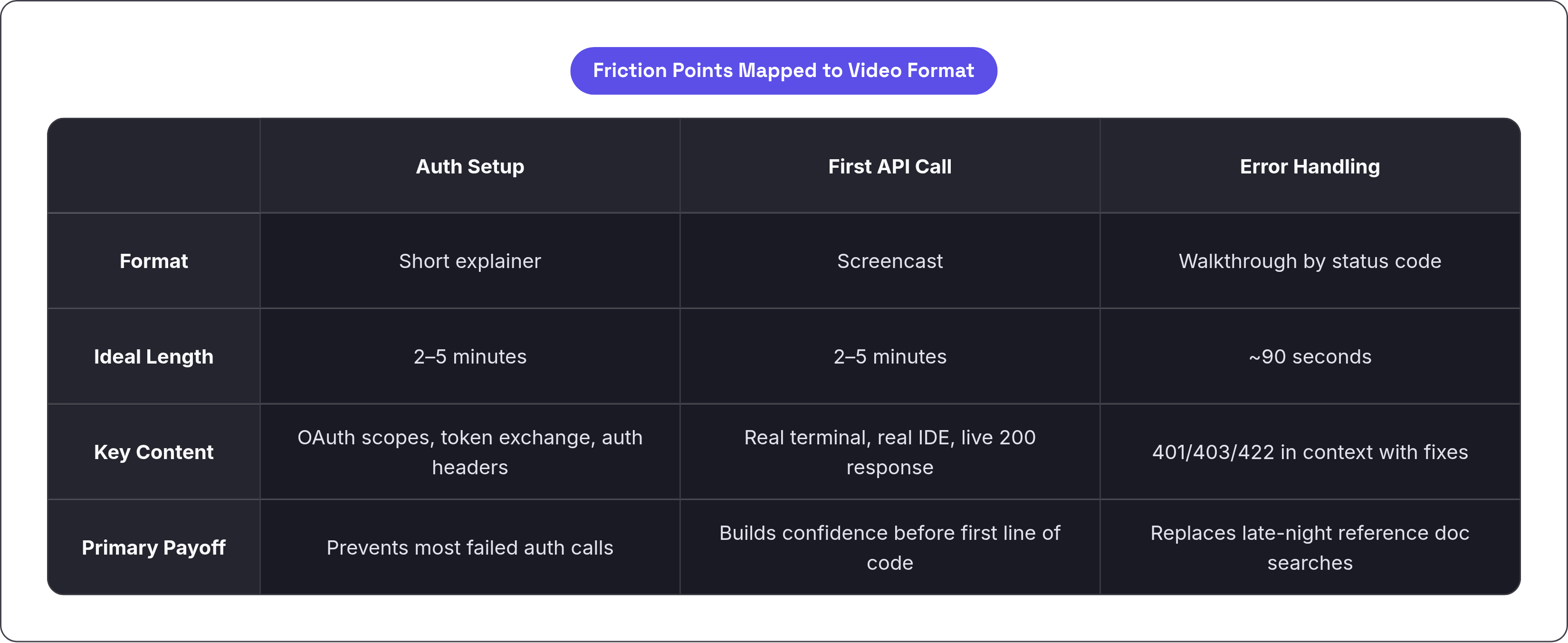
Three friction points. Three video formats. Here's where they actually live.
Auth setup. One documented SaaS case found that a large share of failed API calls came from missing auth headers alone. A short explainer, somewhere in the two to five minute range, covering OAuth scopes, token exchange, and how to construct an auth header properly, prevents most of that. Just enough to avoid the obvious mistakes.
First API call. A screencast. Real terminal output. Real IDE. Not a slide deck with illustrated arrows pointing at a mock response. Developers need to see what a successful API response actually looks like before they write a line of code themselves. Watching that 200 come back and seeing the structure of the payload, that's what builds confidence the API is going to work for them.
Error handling. This is the format almost every API team skips, and skipping it costs real support hours. A dedicated video walking through the most common status codes in context. "Here's a 401, here's why you got it, here's what to change." Developers debugging at 11pm don't want to read three pages of reference docs. They want someone to tell them what's wrong. A 90-second walkthrough gets there faster than anything else you could put on that page.
A few things worth building on top of this structure:
Twilio redesigned their onboarding to embed documentation directly inside tutorials via a slider, so developers get answers without leaving the workflow. Interruptions kill momentum. Cloudinary won the 2024 Best SME Developer Portal Awards partly because of how deliberately they embedded demo videos and built out their tutorial library. Judges noticed. Developers noticed first.
Video paired with a sandbox is more effective than video alone. Watch, then immediately do. Not watch as a substitute for doing.
What makes a developer tutorial video work — and what kills it immediately
The production decision that shapes everything else: one video, one outcome. Not "understand authentication." Specifically: "generate and attach a bearer token to your first request." That level of specificity changes how you script it, how you pace it, and how useful it actually ends up being. Vague outcomes produce videos nobody finishes.
The first 15 seconds determine whether someone stays. State what the viewer will accomplish before you touch any UI. More than 55% of viewers drop off within the first minute. If you open with a logo animation and a company overview, you've already lost a chunk of your audience before the useful part starts.
Then there's the production side:
- Screen clarity beats camera quality. Every time. Developers need to read terminal output. Font size, zoom, cursor visibility. That's what matters. A DSLR pointed at your face is not the bottleneck.
- Audio is non-negotiable. Bad audio is more distracting than low-resolution video. An inexpensive USB microphone in a quiet room beats a 4K setup with an HVAC unit running in the background.
- Captions. 80% of videos are watched on mute. Captions aren't an accessibility afterthought. They're how developers follow code-level content on a train, in an open office, or with sound off because they're already deep in something else.
- Pacing matters for terminal and IDE content. Slow down at command entry. Speed up during loading states. Developers will wait for a curl command to appear. They will skip a progress bar filling in real time.
One thing that doesn't get said enough: pre-production investment pays off hard. Video is significantly harder to update than text docs. Understanding your audience and mapping each step before you start recording prevents expensive re-shoots later. Ask yourself what a developer needs to do, not what you want to explain. Those are different questions with different answers.
How long onboarding videos should be — and where completion drops off
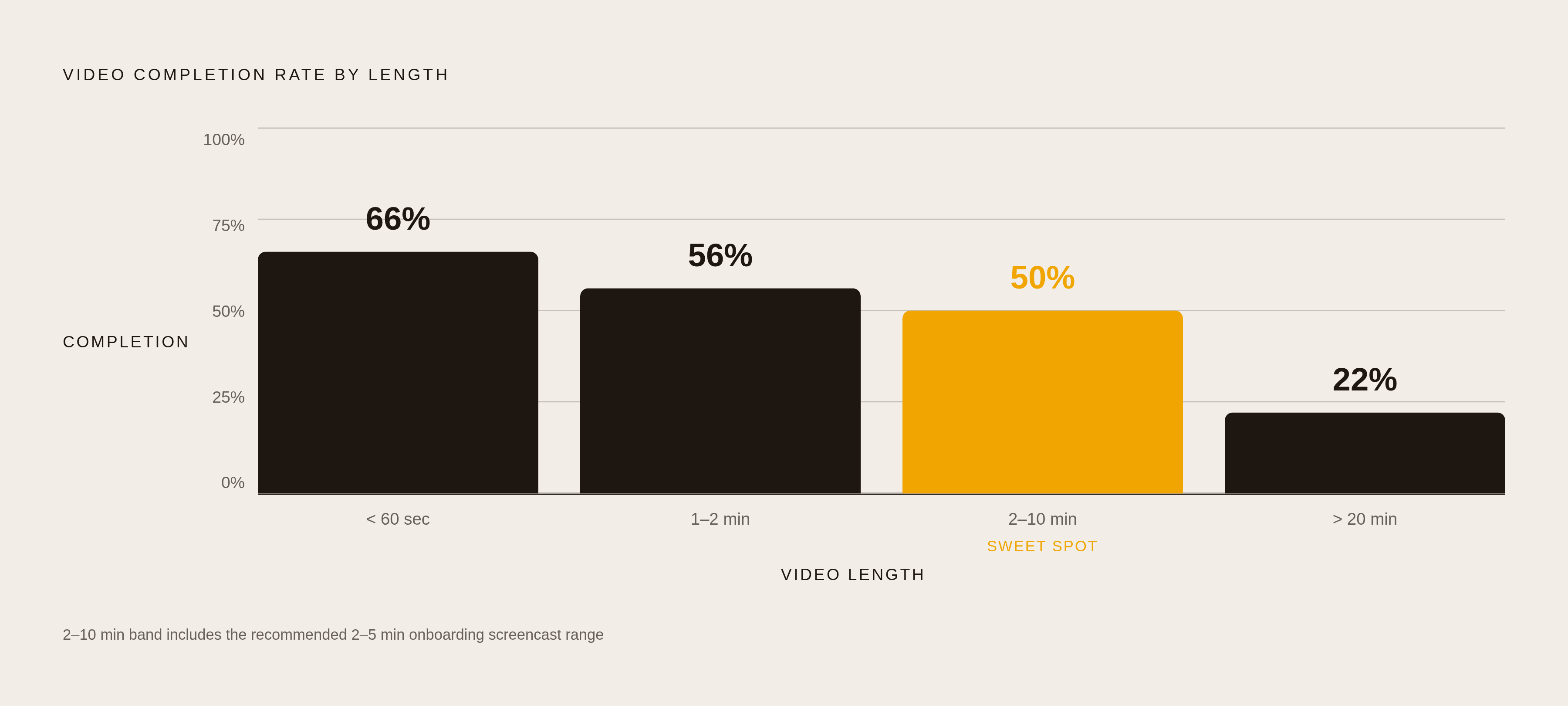
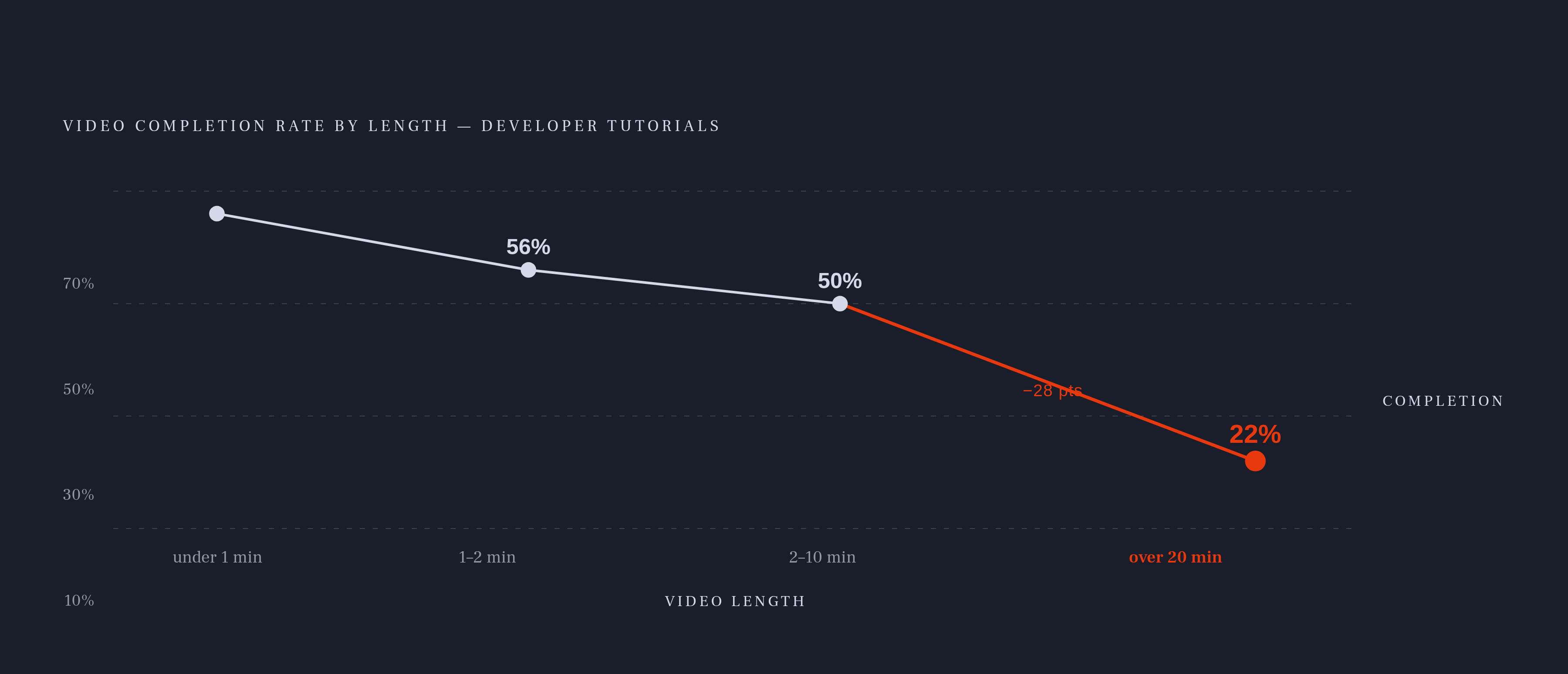
Completion rates fall predictably with length. Sub-60-second videos average 66% completion. One to two minutes drops to 56%. Two to ten minutes lands around 50%. Over 20 minutes, you're looking at roughly 22% completion.
There's a useful nuance on top of that: 36% of viewers prefer videos in the one to six minute range, and 26% prefer ten to nineteen minutes. Two distinct audience segments with different appetites for depth. Both are real. Both are worth serving, just not with the same video.
For onboarding specifically, the two to five minute screencast covering a single task is the sweet spot. Long enough to show a real workflow, short enough that most people finish it.
For deeper integration walkthroughs — multi-step flows, webhook setup, complex error-handling sequences — ten to twenty minutes is defensible. But only once a developer has already made their first call. You've earned that runtime by then.
The most practical implication: break a 20-minute walkthrough into four five-minute videos with specific titles. A developer searching for "handling 401 errors" will find and finish the relevant segment. Scrubbing through a 20-minute monolith to find one section is a different ask entirely, and most developers won't bother. Specific titles also make the content reusable as reference material later, which loops back to the same discovery-versus-reference split from earlier.
Where in the developer portal video produces the most return
Top of the getting-started page. Put a two-minute auth walkthrough there. That's the highest-leverage placement you have. That's where 50% to 70% of developers quit if they hit friction. A short video that says "here's what you need to set up, here's where to get it, here's how to attach it" directly addresses the most common dropout point before it happens.
Inline with code samples. Not below them. Not in a separate "Videos" tab buried in the nav. Inline, in context, next to the thing it explains. Twilio's redesign was specifically about reducing the research interruptions that happen when developers have to leave their current workflow to find an answer. That's the problem the placement solves.
Error reference pages. This is underused real estate. Embed a short video next to the most common status codes: the 401, the 403, the 422. The developer who lands on that page at 11pm debugging a live integration is not browsing. They're stuck. A short video at that moment compresses support ticket volume in ways a reference table simply doesn't.
Sandbox and interactive console entry points. A 60-second orientation video. Not a full tutorial. Just "here's what you're looking at, here's how this works." It reduces blank-page paralysis before someone makes their first console call.
Postman's 2024 report found that 39% of developers cite inconsistent documentation as their primary obstacle. Video placed at the points where documentation is most likely to be incomplete patches that gap without requiring a full docs rewrite.
What to deprioritize: marketing overview videos on the homepage. Long feature tours. Anything that requires a developer to leave their current task to watch it. Those serve a different audience. Keep them separate from developer onboarding content.
Building and maintaining a video onboarding library without it becoming a maintenance burden
The same quality that makes video effective is what makes it fragile. Showing real UI, real responses, real terminal output means that when the dashboard updates or a new API version ships, your video is now lying to developers. This will happen. Plan for it before you record a single frame, not after a version bump breaks three tutorials at once and someone files a bug report against your documentation.
The fix is modularity. Record auth, first call, and error handling as separate files. When the auth flow changes (and it will), you replace one segment. Not the whole library. This sounds obvious and somehow still gets skipped.
Version-pin your videos. Timestamp them. Something as simple as "recorded against v2.3" in the description tells developers whether what they're watching reflects the current API. That transparency beats pretending a video is always current, which is the thing that quietly destroys trust when someone follows the steps and nothing works.
External content strategies also work. Twilio's "Developer Voices" program pays contributors for published tutorials, which keeps onboarding material current without requiring all production to live inside the API team. If you have an active developer community, that pipeline is worth looking at.
The operational cost of maintaining a video library is real. But benchmark it against what better knowledge retention saves in repeated support contacts and re-onboarding cycles. It usually comes out ahead.
Start with your top five developer tasks by support ticket volume or documentation traffic. Make a video for each. Measure TTFC before and after. The goal isn't a complete library on day one. The goal is enough signal to know what's actually moving the number, so you build more of that and less of everything else.

