Creating Product Demo Videos for Developer Tools
Developers trust demos that show real code, actual errors, and unedited wait times.

Summary
Developers trust demos that show real code, actual errors, and unedited wait times.
Most demo videos for developer tools get built like someone's selling software to a marketing director. That instinct is backwards, because developers already know the category, they've read the docs, and they're watching the demo hunting for the crack in it.
Here's the part nobody wants to say out loud: a developer decides whether to trust a tool before anyone from sales ever gets a calendar invite. They read the documentation, watch the demo, form an opinion, and that opinion locks in fast. If the demo hides a step, fakes a load time, or shows a dataset so clean it looks staged, trust is gone before the trial even starts. There's no second first impression with someone who already has fourteen tabs open comparing three competitors side by side.
Most dev tool teams build marketing videos when what they actually need is a technical proof artifact. Those are different objects, and mixing them up is the whole problem.
Picture a founder demoing an API to a room of engineers by narrating over a slide deck, with no terminal in sight, just arrows and boxes and the phrase "seamless integration" repeated four times. A developer in the third row raises a hand and asks, "Can I see it actually run?" The founder says, "Great question, let's take that offline." The room's trust leaves right then.
What developers actually look for in a demo
Developers watch a demo the way they read documentation: hunting for the failure point. Where does it break? Where does it oversimplify? Where did a step get quietly skipped? That instinct is professional habit, because anyone who's shipped code knows the happy path is never the whole story. As one engineer put it after sitting through a particularly polished pitch: "It's not that I don't trust the demo. I just trust the stack trace more."
For a lot of developers, the demo is the first real contact with the product, before the free trial, before the sandbox account even exists. Skip the error states, run everything on a dataset that's obviously been groomed for the camera, and that reads as a signal that the product falls over the second conditions stop being ideal.
What builds trust is unglamorous: real terminal output, actual latency even when it's not instant, error messages that show up on screen and then get resolved in view instead of edited around, and integration steps shown start to finish with no invisible jump from "here's the code" to "and it works."
What kills trust just as fast: a cut from "now I'll run the build" straight to "and here's the result" with the wait erased, a benefit claim the viewer never actually watched happen, or a demo environment that looks nothing like the developer's own terminal, IDE, or file structure. Developers already respond to case studies with real numbers, the kind of specific, measurable outcomes that show up in production-grade documentation, and a demo should hold itself to that same bar.
The principle holds regardless of the product: showing both the warm-cache run and the cold one, side by side, without hiding which is which, does more for trust than any polished edit. Developers sign up because the demo didn't flinch, not because it was flawless.
Pick the right format before scripting anything
Three formats actually work for developer tools, and picking the wrong one is the single most common mistake in the whole process. Screen-recorded walkthroughs with narration show the real product moving at real speed. Terminal or code-first POV recordings drop the viewer directly into the workflow. Motion graphics explainers earn their place only for genuinely abstract architecture, the kind of system diagram that can't be screen-recorded because it's a concept rather than a screen.
An animated UI explainer that never once shows a real terminal or a real code editor is a warning sign, because it usually means the product isn't polished enough to demo honestly, so the team reached for illustration instead. Developers notice the substitution immediately, even when they can't name why the video feels hollow.
Pick the format by asking what question is actually getting answered. "What does integrating this look like?" points to a screen recording. "How does the architecture work under the hood?" might justify a motion graphic, used sparingly. "What does day-one setup really feel like?" calls for a POV walkthrough.
Interactive click-through demos serve self-directed exploration after a video has already earned someone's attention, but they are not interchangeable with a demo video. Lock the format before scripting starts, since the script needs to serve the format, and too many teams write the script first, then force it into whatever format looked good in last quarter's board deck.
Script structure that holds developer attention
Open with a specific, named problem, never a category. "API integration is painful" means nothing to anyone. "You're three hours into debugging a webhook that's silently swallowing errors, with zero visibility into why" is a scenario any developer who's lived through it will recognize immediately.
The "Tell, Show, Tell" structure earns its keep here. Name what's about to happen, demonstrate it without hiding a single step, then explain plainly what just happened and what it means once it's sitting inside a real codebase.
Set an agenda and cap it at three things, since that's the difference between a demo with a point and a feature tour with no destination. A genuinely complex tool becomes tractable the moment the audience knows there are only three things to track.
Every transition owes the viewer an explanation. Cut from "I'll run the build" to "here's the result" and a developer clocks it instantly. Either show the wait or say out loud why it got trimmed. The hardest part to script, and the most important, is the integration section: the tool needs to show up sitting inside a real stack, a real IDE, a real CI config, and an actual dependency file, not floating alone in a blank project.
How long should a developer demo run?
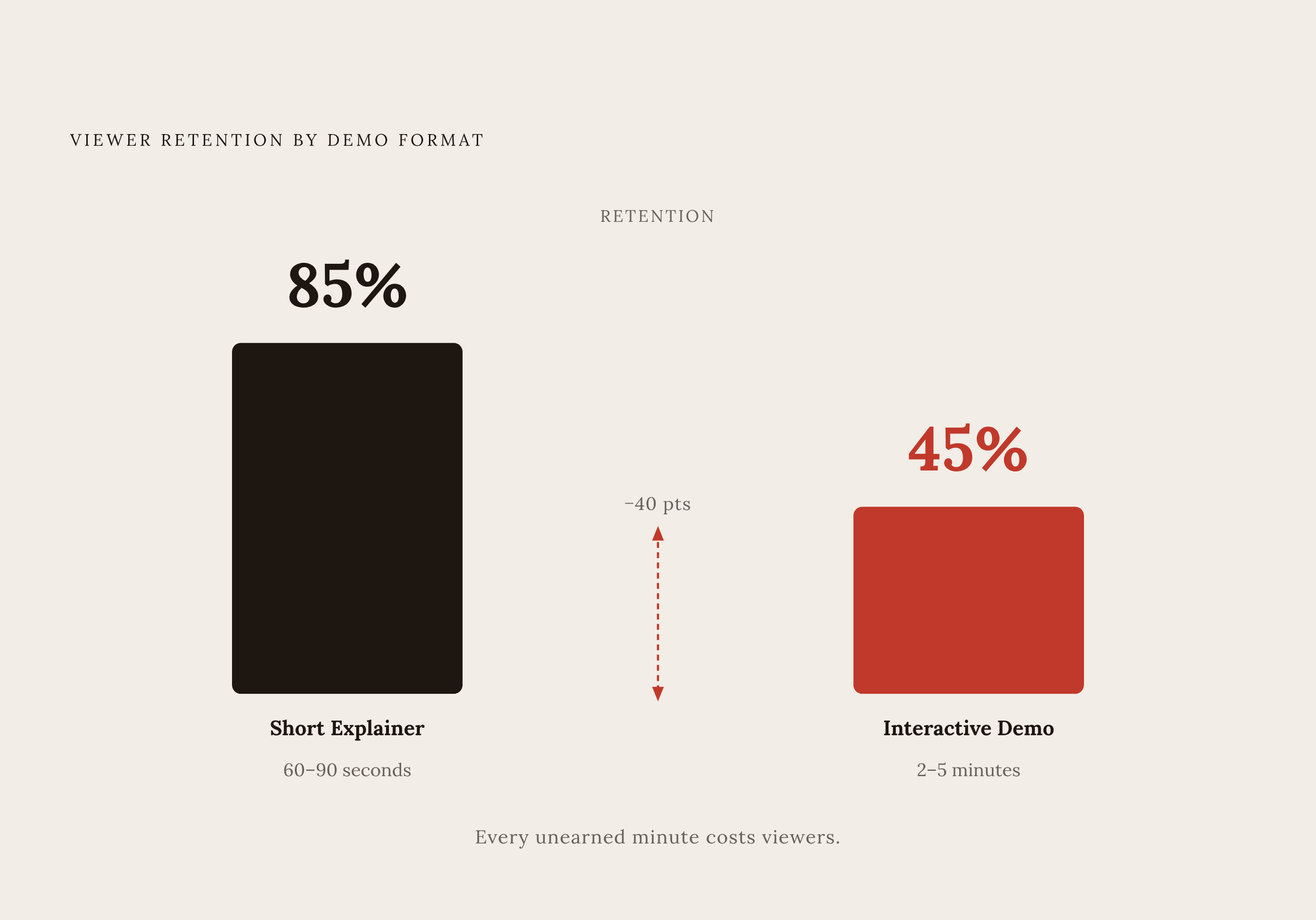
Shorter explainer videos, somewhere around 60 to 90 seconds, tend to hold a large majority of viewers, with retention rates around 85%. Longer interactive demos in the 2 to 5 minute range drop off much further, down near 45%. Every minute asked of the viewer has to be earned rather than justified by chasing a length target pulled from a different category of content entirely.
For developer tools, length should track the complexity of what's being proven. A three-minute demo showing a real, working integration beats a slick ninety-second cut that dodges the hard part every time.
Run this filter on every segment: does cutting it leave a gap a developer would notice? If yes, keep it. If a segment exists only because it looks impressive and not because it's necessary, cut it, because impressive and useful are not the same thing and developers spot the difference on sight. A developer demo should run however long it takes to tell the truth, and not one second longer.
Think modular from the start. A five-minute walkthrough should be built from segments that can be pulled and reused on their own: the authentication piece, the error-handling piece, the CI integration piece, each answering a specific question a specific developer might show up with. Captions matter too, since a large share of people watch video with the sound off, and a developer watching a demo mid-debugging-session with headphones off is squarely in that group.
What production quality signals to developers
Developers spend their days watching screencasts, terminal recordings, and conference talk footage nobody dressed up. High-gloss production reads to this crowd as a marketing budget standing in for product confidence.
What production quality actually needs to deliver is narrower than most teams assume: code readable at full resolution, narration that's clear and audible, no jump cuts hiding a real step, and a demo environment that resembles what the developer sees on their own machine, including dark mode, normal font sizes, and a real filesystem instead of a pristine desktop.
Spend the budget on audio quality, since bad audio is unwatchable and no amount of good content survives it, as well as caption accuracy and stable frame rates during screen capture. Motion graphics and branded animation packages can wait, since they're not where trust gets built.
The real indicator separating a credible demo from a hollow one is whether it was clearly recorded by someone who actually uses the product. Hesitation reads as honest, real-time problem-solving reads as honest, and visible complexity left in instead of edited around reads as honest too. AI-assisted editing tools can speed up caption work and trimming without adding artificial gloss, as long as the tool serves the recording instead of replacing it with something synthetic.
Show the hard parts, not just the happy path
Every developer tool has an awkward joint somewhere: a config file with too many fields, an error that shows up before the happy path even begins, a prerequisite nobody remembers to mention until it's too late. Showing that moment on camera and resolving it in view builds more credibility than editing around it ever could.
Developers hit these moments no matter what. The only real question is where they hit them first: in the demo, where the fix gets shown step by step, or alone in their own terminal with no guide in sight. One of those experiences builds loyalty, while the other generates a support ticket.
Naming a limitation out loud on camera, for example saying "this currently needs a restart" or "yeah, this error message is genuinely unhelpful, here's what it's actually telling you," functions as a display of technical authority rather than a weakness to hide.
Skip the perfect-run demo where nothing goes wrong. Developers know that's staged, and once they recognize the staging, everything else the video claims becomes suspect. This is exactly where a real engineer or developer advocate narrating in their own voice beats a professional voiceover artist reading someone else's script. The credibility comes from the fact that the person talking has clearly typed the command before, more than once.
Fit the demo into a trust-building content system
A demo video has one job: earn enough trust that a developer is willing to try the product. It cannot replace documentation, tutorials, or an error reference page. Asking a three-minute video to do the job of a full docs site sets it up to fail.
The content sequence that works runs in order. The demo makes the claim, quickstart documentation lets the developer verify that claim themselves with hands on keyboard, and practitioner tutorials show how the tool behaves inside their specific stack rather than a generic one. Case studies with hard numbers around latency, cost, and scale confirm the tool holds up in production.
A technically rigorous demo authored by a recognized engineer shapes purchasing decisions directly for a meaningful share of B2B buyers, particularly in developer tools. The same asset can be distributed in multiple forms: a full walkthrough gets clipped for a technical newsletter, turned into a still-frame sequence for a docs page, cut short for a launch post, and folded into the product's onboarding flow as a reference asset.
Treat the demo as something that has to stay alive. When the interface changes and the demo doesn't get updated to match, it stops being neutral and starts working against trust, since a demo showing an old UI actively misleads rather than informs. Developers approach demo content the way they approach documentation: as a test of whether the tool is honest about what it can and can't do. Proof integrity beats production fidelity every time, and a recording with real terminal output, real error states, and real latency earns more trust than any voiceover will. For B2B SaaS companies publishing developer content at scale, platforms like Letterbrace, which track both search visibility and whether AI models actually cite and recommend a given tool, make that distinction measurable.
Treat the demo like the highest-stakes asset in the whole content stack, because it is one. It deserves the same planning rigor as a technical tutorial or an architecture doc, and its performance, including watch time, drop-off point, and downstream trial signups, deserves the same tracking discipline as any other line item the team has to defend in a budget meeting.

