Technical Video Production Without a Dedicated Studio
Short, focused technical videos beat lengthy demos that viewers abandon before finishing.

Summary
Short, focused technical videos beat lengthy demos that viewers abandon before finishing.
What "studio-free" means for technical video
You don't need a soundproof room and a boom mic to make a demo video that closes deals. What you actually need is a decision order: script first, tool second, environment third, and a clear answer on when to just pay someone else to do it. That order is the whole game, and most teams get it backwards, usually by buying software before they've written a single sentence of what the video is supposed to say.
Studio-free means no dedicated filming room, no lighting rig bolted to the ceiling, no crew standing around with a clipboard. It means a laptop, a decent microphone, and a room that doesn't sound like a server closet.
For B2B SaaS, "technical video" usually breaks down into a handful of familiar formats: screen recordings, product demos, UI walkthroughs, onboarding flows, explainer animations. None of these live or die on cinematography. They live or die on whether your viewer can tell what button to click and why it matters. A slightly soft shadow on your face costs you nothing. A confusing screen recording costs you the whole video.
You probably already know this, even if nobody's said it out loud in the planning meeting. Most video gets built in-house rather than shipped out entirely, so what matters is whether your in-house version is any good. This piece covers two modes that both count as studio-free from your audience's perspective: doing it yourself with the right tools, and handing it to a specialist agency that takes over production. Both are legitimate. Neither needs a room lined with acoustic foam.
Why B2B video length compressed and what it demands
Average B2B video length has compressed significantly, from 168 seconds to 76 seconds, driven by platform algorithms that reward completion and buyers who bail early.
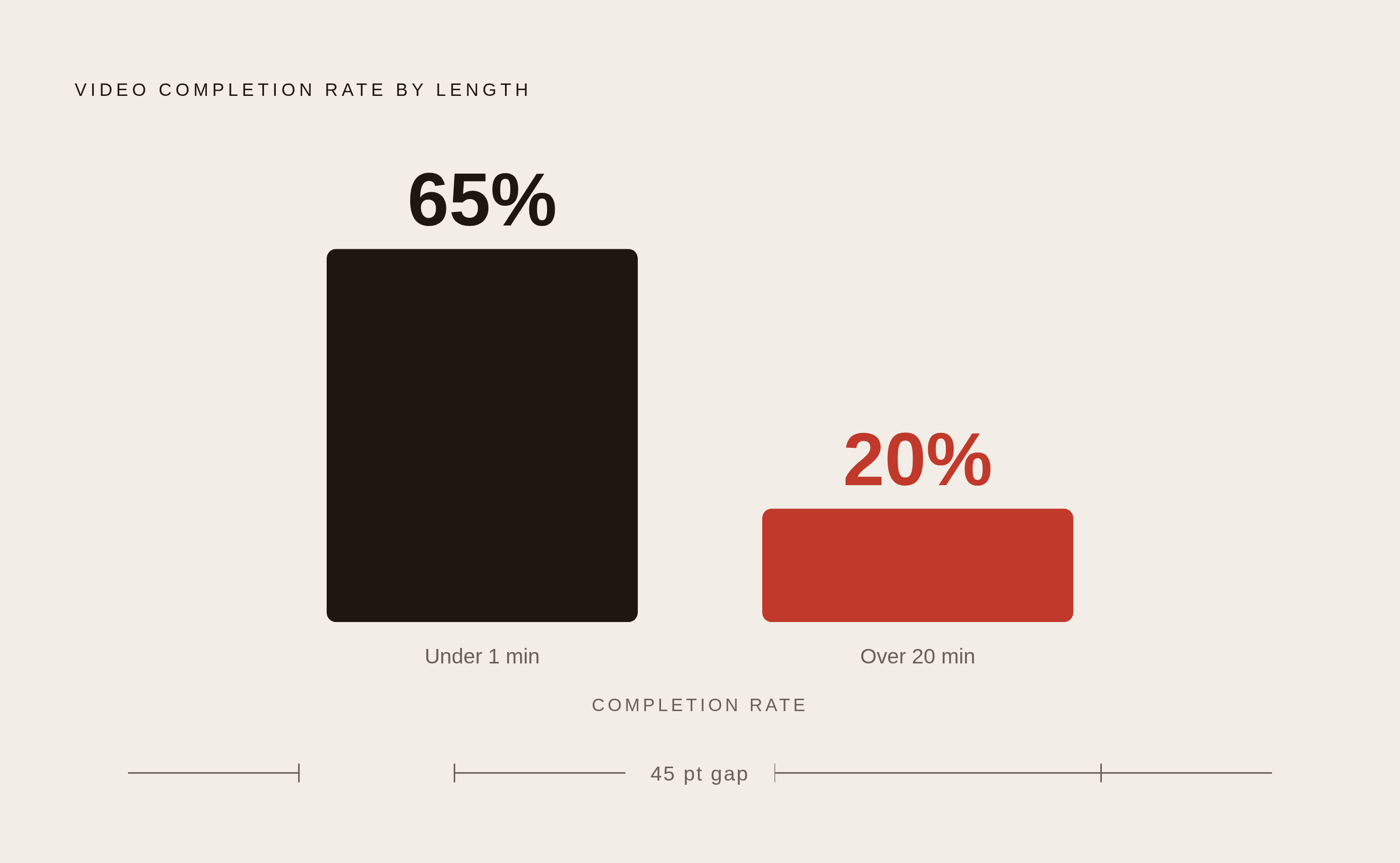
Videos under a minute finish at a 65% completion rate. Videos over 20 minutes finish at 20%. That gap separates a video doing its job from a video sitting in an analytics dashboard nobody opens.
For your technical demo, drop the habit of trying to cover every feature in one continuous walkthrough. That format is dead on arrival at 76 seconds. Aim for one problem, one outcome, one video. If your product does twelve things, make twelve videos, not one long one nobody finishes.
The first 30 seconds are the whole bet. Most of the drop-off happens right there, so move whatever hook or payoff you planned for the middle to the front. Your viewer won't stick around to see if the video gets good later.
Write the script before choosing the tool
Picking Loom or Camtasia before you've written a word is a mistake. The script comes first, and a script that's actually ready for production does double duty: it's a writing plan and a shot list at once. Every line of narration needs a visual sitting right next to it, not floating somewhere to be figured out later on the recording floor.
The Problem-Agitate-Solution formula is the most dependable structure for a 60-second SaaS explainer. Name the problem the viewer already has. Sit in it long enough that they feel the friction themselves. Then show the fix.
Hook-first structure flips the order: state the payoff before the intro, then run through five to seven small setup-tension-payoff loops, each one slightly higher stakes than the last, before landing on a recap and one specific next action. Skip the vague "learn more" at the end. Tell the viewer what to click.
Jargon is where technical scripts quietly lose people. Every technical term charges a clarity tax: the audience pays a small comprehension cost each time you use one, and those costs stack fast. "RESTful architecture with JSON payloads" sounds accurate to the engineer who wrote it and means nothing to the buyer watching it. "Integrate your entire tech stack in minutes without custom code" says the same thing and actually lands.
Match your recording tool to the video type
Tool choice is a decision tree, not a preference. Start with what you're actually making, because the wrong tool here doesn't ruin the video, it just wastes an afternoon.
A quick async walkthrough for a colleague or a prospect calls for Loom. It recorded 93 million videos in 2025 and holds a 4.7 out of 5 across 2,349 reviews on G2, with ease of use as the most-cited strength (330 separate mentions). Accounts created after February 2026 no longer get the free Creator Lite seat, and existing accounts have been losing that tier on a rolling basis as billing shifted to Atlassian's tiered plans. Reviews on Trustpilot and Reddit describe surprise invoices and upload failures tied to that migration, so budget for it before it surprises you.
If you're editing recorded footage and hate scrubbing timelines, Descript edits video by editing the transcript instead: cut a sentence from the text, and the matching clip disappears. Filler words get trimmed automatically, and it'll summarize a video on command. As of August 2026, pricing runs from Hobbyist at $16 a month billed annually (10 media hours, 400 AI credits, 1080p export), up to Creator at $24 (30 hours, 800 credits, 4K), up to Business at $50 (40 hours, 1,500 credits).
For a polished, structured tutorial that needs transitions, green screen, cursor smoothing, and AI-assisted editing, Camtasia is built for exactly that. Educators and anyone building a software walkthrough meant to look finished rather than fast will run into it most often.
Beyond those three, here are additional options worth knowing: OBS Studio covers free, flexible scene recording with no real limits, if you're comfortable with a steeper setup curve. Tella pairs screen and camera with built-in analytics. StreamYard handles a live presenter-plus-demo layout, useful when you're talking over a screen share in real time.
Fix audio and lighting before touching gear
91% of companies use video and rising. Buyers are watching a lot of this content, and the bar for "looks professional enough" keeps climbing even as budgets stay flat. Credibility disappears the second the audio crackles or the lighting looks like it was filmed in a parking garage.
Audio comes first, always. A noisy room is nearly impossible to fix after the fact. A cheap microphone is easy to fix with a plugin. That means a quiet closet with a $50 USB mic beats a beautifully built studio sitting three feet from a loud HVAC vent, every single time. Fix the room before you touch the gear.
Lighting doesn't need a kit. A window on one side of your face and a lamp or reflector on the other clears up most of the amateur look people associate with low-budget video. Ring lights are a shortcut for solo creators, not a requirement for anyone else.
A clean, neutral wall or an honest, lived-in workspace reads as real. An elaborate virtual background usually reads as an attempt to compensate, and that will register as a credibility problem for your technical audience.
When to outsource versus build internal workflows
The math here is straightforward once you count videos instead of estimating by feel. At two or three videos a year, a project-based studio makes sense. At ten or more, a subscription partner usually costs less across twelve months, because you're not paying setup fees over and over on every single deliverable.
Pricing across the market varies considerably. Demo Duck starts around $25,000 with a six-to-ten-week timeline. Vidico runs a subscription model from $5,000 a month, all services bundled in. Superside costs $15,000 a month. Yum Yum Videos prices project-based work from roughly $8,000 to $30,000, and Levitate Media from roughly $4,500 to $25,000. Epipheo starts at $15,000, Umault at $50,000. Digital Spark Studios ranges from about $20,000 to $80,000 depending on scope. Bottle Rocket Media starts project pricing around $15,000, and LocalEyes costs mid-range for project-based work.
Synthesia takes a different approach: text to video in minutes, best suited for high-volume training, onboarding, and internal communications where polish matters less than speed and scale. Professional production still wins when the asset needs to convert a buyer or represent the brand externally, and no AI avatar reads as trustworthy enough to close a six-figure deal yet.
Roughly a tenth of businesses go fully external, and about a third run a mix of internal and outsourced work. You'll likely land somewhere in the middle. The real decision is which specific jobs go where, not a blanket choice between in-house or agency. Pretending otherwise is how you end up paying agency rates for a Loom video you could have recorded in ten minutes.
Repurpose existing assets to scale output cheaply
Budget constraints limit a significant share of companies from scaling video production while appetite for more content keeps climbing, which makes repurposing less of a creative nicety and more of a financial necessity.
One well-recorded webinar or one founder podcast episode can produce a meaningful stack of short-form clips without commissioning a single new shoot. The raw footage already exists, and cutting it down costs a fraction of what filming something new would.
AI tools have made that cutting-down process considerably less painful. Usage of AI in video editing and repurposing jumped from 18% to 41% in a single year, and 63% of video marketers report using AI tools to create or edit marketing video. Repurposing is the main use case there, not generating original footage from scratch, which tells you where the real time savings live right now.
Where that repurposed content lands matters as much as the content itself. LinkedIn is a key channel for B2B SaaS short-form video in 2026, and native uploads consistently outperform posted external links. Upload directly to the platform your buyer is already on, rather than sharing an external link.
Measure completion rates before blaming production quality
Video ROI still looks good on paper: 82% of video marketers report a positive return. That's down from 93% a year earlier, and the drop traces back to rising production costs, tighter measurement standards, or some mix of both. Either explanation matters directly to a studio-free team trying to justify its own workflow with real numbers.
Strategy is where most of the gap actually lives, not production quality. Most tech marketers say they have a content marketing strategy in place, yet only 29% of B2B tech marketers have a formal AI governance policy, a sign that strategy often runs ahead of the governance infrastructure needed to support it.
Completion rate is still the cleanest early signal available. Videos under a minute finish at 65%, and videos past 20 minutes finish at 20%. If your short video is landing well below that 65% mark, the fix is the script, not better lighting or a nicer camera. Viewers don't stop watching because the video looks cheap. They stop watching because the first ten seconds didn't tell them why to keep going.
Video is increasingly a delivery mechanism for text, not just for itself. AI answer engines and search both read the transcript and the writing built around your video. The polished demo gets your viewer to watch. The structured transcript and supporting copy around it are what get cited, indexed, and surfaced when someone asks an AI tool a question your product answers.


