Keeping Technical Videos Accurate After Product Updates
Systematic maintenance prevents outdated videos from eroding user trust and training consistency.

Summary
Systematic maintenance prevents outdated videos from eroding user trust and training consistency.
Most technical video libraries aren't maintained. They're abandoned and then periodically rescued. A product ships an update, someone notices a tutorial is wrong, and whoever created the original video gets tagged in a Slack message asking if they can "take a quick look." That's the system. And it doesn't work at scale. The fix isn't more effort. It's a different model: proactive maintenance built around modular video structure, release-cycle integration, and scheduled audits. Teams that build this system stop scrambling. Teams that skip it keep inheriting the mess.
What outdated videos actually cost users and teams
Here's how the damage actually starts. A button gets renamed. A menu moves. A workflow gains one extra step. Small stuff. But a viewer watching your tutorial now has to reconcile what they're seeing on screen with what you're showing them, in real time, while also trying to learn something. That friction is real.
A 2024 study out of Inria laboratory identified 13 distinct types of UI differences that can exist between a video tutorial and a learner's actual interface. Thirteen. And each one creates a moment where the viewer has to decide: do I trust this video, or do I trust what I'm looking at? Most of them stop trusting the video.
The trust damage compounds in onboarding contexts specifically. A new employee watches hours of training. None of it matches the real product. So they do what people do. They ask a coworker. That coworker tells them something slightly different than what the next coworker says. Now you have a content problem that has become an execution problem. The video was supposed to create consistency and it created the opposite.
There's also a compliance dimension that gets overlooked until it bites someone. In enterprise environments, proving which version of training content an employee completed, and when, is directly tied to compliance readiness. An outdated video isn't just confusing. It's a documentation liability.
And one more thing worth saying plainly: a disclaimer doesn't fix this. Slapping "content may not reflect the latest UI" at the top of a video is not maintenance. It's a flag that says "we know this is wrong and we're leaving it." Users read that exactly as intended.
How a reactive maintenance model compounds over time
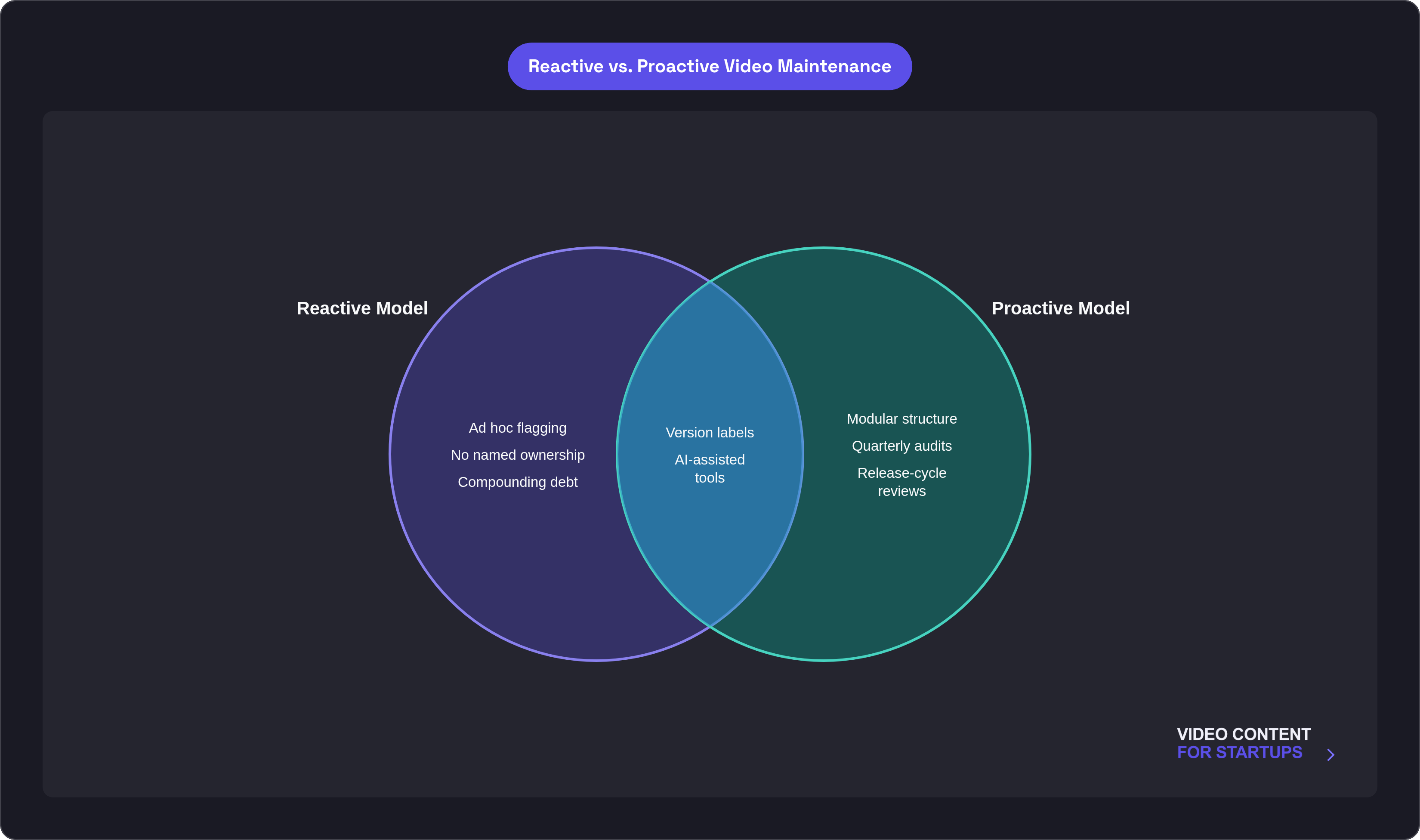
The default process at most teams looks like this:
- Someone notices a video is outdated
- They flag it to whoever made it
- That person is busy, so it sits
- More updates ship
- Now two things are wrong in the video
- Eventually it gets re-recorded, or quietly forgotten
The problem with this model isn't just that it's slow. It's that the maintenance burden doesn't grow in a straight line with your library size. It compounds. A hundred videos and a major platform redesign can mean thirty or forty videos outdated at the same moment. That's not a bad week. That's a crisis.
The quiet accelerant is the absence of named ownership. Without a clear person responsible for a video, or a defined cadence for reviewing it, maintenance defaults to whoever shouted last. TechSmith's research points to this directly. No ownership means no cadence. No cadence means the library slowly becomes a liability.
There's also a hidden cost structure to the reactive model that never shows up in a time estimate. Fixing a video after confused users file support tickets costs more than fixing it proactively. And the trust cost, once a user has already been burned by outdated content, doesn't appear anywhere in the rework estimate.
The shift that's required here is conceptual before it's operational. The video library isn't a completed project. It's a managed portfolio. Those are two completely different things.
Building videos in a modular structure to make updates surgical
This is the decision that makes everything else easier or harder. And it has to be made at production time, not after the library already exists.
Modular structure means building each video as a sequence of independent, replaceable clips rather than one continuous recording. One clip for each step or concept. When a step changes, you replace that clip. You don't touch anything else.
The practical difference is significant:
- Updating one changed step in a modular video: an afternoon
- Re-recording a monolithic video covering the same content: potentially a week
The other half of this is source file discipline. Store labeled project files, not just exported MP4s. Something like "CustomerOnboardingv2_2025" tells you exactly what you're looking at and when it was last touched. If you only keep the final export, you have to start from scratch every single time you need to update something. That's not a small inefficiency. It accumulates fast.
Modular structure also makes distributed ownership possible. When each clip has a clear, bounded scope, you can assign different sections to different people. That's hard to do with a monolithic recording where everything is stitched together.
Retrofitting an existing monolithic library into modular clips is expensive and painful. Make the architecture decision now, at the start, before your library grows large enough that the cost of changing it becomes prohibitive.
Embedding video review into the product release cycle
The product release cycle is already happening. This approach doesn't add overhead. It attaches content review to a process that exists anyway.
The mechanism is straightforward. The product team shares a changelog or feature diff 48 to 72 hours before a release ships. Content owners review it, map any changes to affected videos, and assign updates before the release goes live. No new meetings. No new processes. Just a handoff that's already happening, with one more recipient.
The strongest version of this is making documentation updates a required condition for a feature to be considered "done." The update can't be skipped. It's part of the definition of shipped. That's not a content team policy. That's an engineering process decision, and it's the most durable way to prevent the maintenance gap from opening in the first place.
Practical targets to aim for:
- Workflow changes updated before customers encounter them
- Visual-only changes (renamed buttons, UI refreshes) updated within 48 hours of release
Named ownership is what makes the cadence actually work. A library of a hundred videos distributed across ten people who each own ten is manageable. The same library concentrated in one person is a burnout risk. Both libraries have the same number of videos. The risk profile is completely different.
Running quarterly audits to catch what release-cycle reviews miss
Release-cycle reviews catch discrete changes. What they miss is everything that drifts without a release event.
Branding evolves gradually. UI skins change over a series of minor updates and nobody calls it a release. A process that used to take four steps quietly becomes a three-step process through accumulated small changes. None of that triggers a changelog entry. But it still breaks your videos.
A quarterly audit catches all of it. And it's not the time commitment it sounds like. You can audit a hundred-video library in four to six hours. That's the concrete time investment on one side of the scale. The other side is the compounding debt of skipping it.
Recommended audit cadences vary by content type:
- Semi-annual for technical skills and general product knowledge
- Quarterly or event-driven for compliance-heavy topics like data security and financial reporting
The audit is also when you make triage decisions. Every outdated video warrants a different response:
- Still accurate: refresh the metadata and version label
- Partly outdated: replace only the affected section
- Core information is wrong: create a new version and redirect viewers from the old one
Treating the audit as a regular governance ritual is what separates a managed portfolio from an accumulating liability. The difference between those two things is not the size of the library. It's whether someone is looking at it on a schedule.
Using version labels and changelogs to maintain viewer trust between updates
This one is simple and consistently skipped.
A visible note that says "Updated March 2025 to reflect the new dashboard UI" does something important. It tells your viewer the content has been checked. It gives them a reference point for anything that still looks slightly different. And it signals that any discrepancy they notice is a known, managed gap, not evidence that your whole library is a mess.
Without that signal, your viewers have no way to calibrate. They don't know if the video was made last month or three years ago. They don't know if the thing they're looking at that doesn't match is a known issue or a sign that nothing in your library can be trusted.
Internally, a change log with version numbering adds clarity for the people maintaining the library. When was this last touched? What changed? Who did it? Those questions take seconds to answer when the answer is documented. Without documentation, they require archaeology.
In compliance and enterprise contexts, this becomes more than a courtesy. Proving when a video was updated and what changed is part of treating version control as a governance issue. The label isn't just for viewers. It's part of the record.
Where AI-assisted tools fit into this maintenance workflow
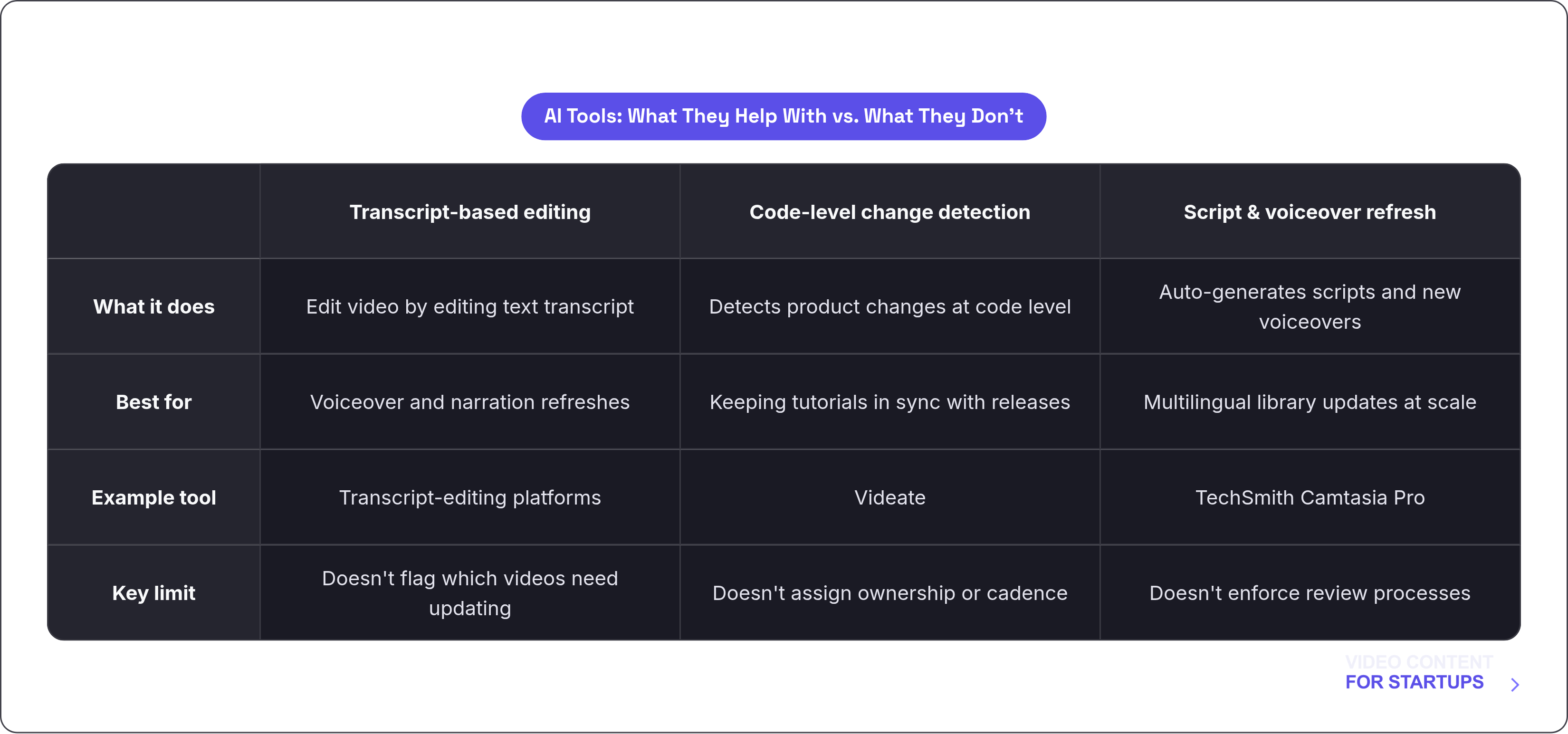
AI tools are genuinely useful here. They're just useful for a specific slice of the problem.
Here's where they actually help:
- Transcript-based editing. Tools that let you update a video by editing its text transcript, where deleting a sentence automatically removes the corresponding audio and video, then regenerates a new voiceover in the same voice. That's a legitimate time saver for voiceover refreshes.
- Code-level change detection. Platforms like Videate capture changes at the code level and can keep tutorials in sync with product updates without manual re-recording for minor changes.
- Automated script generation and voiceover refresh. TechSmith's Camtasia Pro handles this, which matters especially for multilingual libraries where re-recording every language track manually is a serious bottleneck.
The highest-volume, lowest-complexity update tasks at scale are visual-only updates and voiceover refreshes. That's exactly where these tools earn their place.
The honest limit though: AI tools accelerate production and update cycles. They do not detect which videos need updating. They don't assign ownership. They don't enforce review cadences. Those are process decisions. No tool makes them for you.
The system described in the preceding sections has to exist first. AI fits into that system as an accelerant. It doesn't replace the system.

