Explaining Complex APIs on Camera
Developers trust authentic makers over polished marketing in technical videos.

Summary
Developers trust authentic makers over polished marketing in technical videos.
What developers actually want from a technical video
Forget the production value conversation for a second. It is mostly a distraction, and I say that having spent way too many hours early in my career fussing over screen resolution when the real problem was that nobody could follow what I was actually showing them.
Survey data backs this up: only a small fraction of developers say clear visuals are the mark of a quality technical video. Almost nobody picks balanced slides and demos as a quality signal. Slide decks, in fact, obscure the actual work. They replace the thing with a description of the thing. I have sat through enough company-produced API overview videos that were basically animated bullet points with a voiceover to know this is a real, recurring problem.
What developers actually want from a technical video:
- To understand a concept they have been stuck on
- To solve a specific, immediate problem
- To hear from someone who built the thing, not someone narrating a script about it
That last one matters more than most teams realize. A raw walkthrough from the engineer who designed the auth flow will outperform a polished marketing voiceover almost every time. Developers are good at detecting when someone actually knows the material versus when someone is reading approved talking points. The tells are everywhere: imprecise word choice, skipping over the part that is actually confusing, never once acknowledging that a step will go wrong.
Authenticity here is not a vibe. It is a trust signal with real downstream effects on whether someone keeps watching. Think of it like a handshake: if the grip is limp and rehearsed, you notice immediately, and you do not forget it.
Choosing the right scope before recording anything
The biggest mistake I see before anyone hits record is trying to cover too much in one video. I made this mistake myself. I once recorded a 45-minute walkthrough that covered setup, auth, three core endpoints, webhooks, and error handling. It was technically thorough. It was also useless. Nobody watched past the 12-minute mark, and I had no good answer for why I thought one video should do all of that. It was like packing for a weekend trip by bringing every piece of clothing you own — comprehensive, sure, but you cannot actually use any of it.
A practical rule: focus video tutorials on the top five developer tasks. Those five tasks typically cover the overwhelming majority of real use cases. Everything else can live in text reference docs. This is not a concession. It is the right tool for the right job.
Before you scope a single video, ask where the viewer is in their journey with your API:
- Discovery. What does this API do? Should I even use it?
- Evaluation. How does it compare to alternatives? What are the tradeoffs?
- Learning. Walk me through the basics.
- Building. Show me the advanced patterns.
- Scaling. How does this behave under enterprise load or edge cases?
Each stage is a different video. A discovery video and a scaling video should not look anything alike. Mixing those audiences in one recording is how you end up with something that satisfies nobody, which is its own special kind of failure because you did all the work and got none of the benefit.
For API video specifically, the highest-return starting points are almost always the same: the authentication flow, the first successful API call, and your two or three highest-traffic endpoints. Ship those first. Add more later.
One naming note that sounds minor but is not: title your videos by task, not by feature. "Authenticate with OAuth 2.0" is findable and immediately clear. "Auth Overview" is neither. Developers search for what they are trying to accomplish. They are not browsing your organizational hierarchy for fun.
On length: most developers are fine with 15 to 30 minutes for a full walkthrough. For single-task clips, shorter is better. Match the length to the scope, and do not pad.
Structuring a single API walkthrough so the logic is visible
Structure is the difference between a video that teaches and a video that merely demonstrates. Demonstrating is easy. Teaching takes discipline.
Start with the "why." Before you write a single line of code, state the problem the API call solves. Viewers need context to know what to pay attention to. Skipping this is like handing someone a solution without telling them the problem it solves. They will watch the whole thing and still not be sure when they are supposed to use it.
Happy path first. Show the clean, successful request and response before you introduce anything that can go wrong. Cognitive load climbs fast. If a viewer hits an error before they have seen what success looks like, they are lost and they are going to stay lost.
Then break things on purpose. Show an auth error. Send a malformed request. Trigger a rate-limit response. Show how to read those error messages and respond to them. This is actually where your credibility gets established. Anyone can show a thing working. Showing a thing failing, and then calmly explaining what the error means and how to fix it, is what separates a practitioner from someone who just prepared a demo.
Label complex flows as segments. If you are walking through OAuth with a token refresh, or a paginated response, or webhook verification, break those into named chapters within the video. Viewers often need to re-watch one specific step. If you do not label the segments, they will scrub through the whole thing trying to find it, not find it quickly enough, and give up.
Explain before sending. Walk through the request structure on screen before you actually send it. What does each parameter do? Why is it set this way? Then send. Then read the response aloud and annotate it. The explain-then-execute rhythm is what makes the logic visible. Without it, you are just showing a thing happening, and the viewer is watching without really following.
On-screen code clarity: font size, zoom, and what to show at once
This section will feel nitpicky. It is not. Code that is hard to read is not being read, and that is just what happens.
The minimum font size for screencasts is 24pt for both code and terminal text. You can get away with 20 to 22pt in some contexts. Below that, viewers on standard screens cannot comfortably read what you are showing them, and the video quietly stops working. Nobody closes the tab and sends you feedback. They just stop paying attention.
If a code block does not fit at a readable size, break it across multiple lines. Never shrink the font to fit more on screen. The point is legibility, not density.
Show only the relevant portion of a file at a time. A 200-line file on screen at once does not give viewers context. It buries the three lines that matter. Your editor's fold feature exists for exactly this reason.
Keep your narration and your cursor synchronized. When you describe a parameter, your cursor should be on that parameter. This sounds obvious and it still goes wrong constantly in screencasts, including ones I have made. Describing something that is off-screen while showing something else is one of the fastest ways to lose a viewer. Their attention follows your cursor, not your voice.
On syntax highlighting: pick a theme with high contrast that survives screen recording compression. Dark themes with muted, beautiful colors can become a blurry grey mess once the file is compressed. Test your recording before you commit to a theme. This is a 10-minute check that saves real headaches later.
Live coding on camera: what it teaches that prepared slides cannot
Live coding is the most instructionally powerful format for API walkthroughs. It is also the most demanding for the presenter, and I want to be honest about both sides of that.
Here is what it does that nothing else can: it models how an experienced developer actually works with an API. Reading an error message. Adjusting a parameter. Checking the shape of a response. That process, watching someone navigate the real thing in real time, teaches debugging instincts that a clean, prewritten sample never will. Research on live coding pedagogy backs this up. Watching someone recover from a mistake is often more valuable than watching them succeed on the first try.
The cost is real, though. Live coding sessions can take up to twice as long as presenting static code, and the cognitive load on the presenter is genuinely high. You are managing narration, typing, tracking where you are in the flow, and monitoring whether the viewer is following. That is a lot at once. I have fumbled through enough live demos to have real respect for what that juggling act takes.
A few practical ways to handle it:
- Tools like LEO, an open-source project, can auto-type prewritten code character by character. This lets you focus on the explanation while the typing happens at a controlled pace, which removes one layer of the cognitive load.
- The prerecorded live-coding format is the practical middle ground for most developer advocates. Record a live session, then edit it. You preserve the pedagogical value of showing process and mistakes while removing the risk of a live derailment. The viewer still gets to see the work happening. They do not need to see the 20-minute detour where your terminal environment was misconfigured. (Nobody needs to see that.)
Pacing, pauses, and directing viewer attention during a demo
Pacing is one of those things that feels invisible when it is right and is extremely obvious when it is wrong.
Pause before sending a request. Give viewers a moment to read what is on screen. The response is about to change everything they are looking at. Let them absorb the request first.
Narrate intent before action. Say "I'm going to add the Authorization header now" before you type it, not while you are typing it. When narration and typing happen simultaneously, viewers have to choose between reading the screen and listening to you. They cannot do both well.
Use zoom or highlight tools. When you are talking about three specific tokens in a 40-line response body, the other 37 lines are noise. Pull the viewer's focus to what matters. Most screen recording tools have a zoom or spotlight feature. It is worth learning.
Let silence exist. A short pause after a key point gives the information somewhere to land. Constant narration at a uniform pace, with no variation, is harder to follow than narration with deliberate beats. Silence is not dead air. It is processing time. You may have to consciously practice it, because the instinct is always to keep talking.
Name context switches out loud. When you move from your terminal to your editor to a browser, say so. "Now I'll check the response in the terminal." Context switches are disorienting without a verbal anchor. Viewers who lose the thread in a context switch rarely find it again.
Presenter presence and the trust signals that make developers keep watching
You do not need to be on camera. But if you are, it helps more than most people expect.
Head-and-shoulders framing with a visible face builds more trust than a voice-over screencast. The human presence creates a connection that keeps a viewer through a difficult sequence. When things get complex and someone is on the edge of bailing, seeing a real person helps them stay. There is no clean scientific explanation for why this works as well as it does. It just does.
Speak as if you are teaching one person, not presenting to a room. The conversational register closes the gap between expert and learner. It is the difference between "the OAuth token is then passed to the header" and "so now we take that token and stick it in the Authorization header, like this." Same information. Very different experience.
On gear: a decent microphone matters more than a good camera. Developers will watch an imperfect video. Poor audio is the most common reason to abandon one. Invest there first.
The job of the presenter in a technical video is not to sell. It is to deliver the same clarity that good written documentation delivers, but in spoken form. The 2024 Stack Overflow Developer Survey found that the overwhelming majority of developers rely heavily on clear, actionable technical documentation to learn and solve problems. The video is that documentation in a different format, and it has to earn the same standard.
One more thing that is not optional: subtitles and on-screen text labels. A large portion of videos are watched on mute. If the only place a key piece of information lives is in your narration, a meaningful chunk of your audience is missing it entirely.
Code accuracy as a credibility floor, not a production detail
People treat this like a production detail. It is not. It is the floor.
The moment a developer copies a code snippet from your tutorial and it throws an error, your credibility is gone. That developer is now telling people your docs are broken, and they are right. Recovery from that is slow, expensive, and involves a lot of apologetic changelog entries. You could call it a real documentation debt — except unlike financial debt, the interest compounds in public.
Every code sample shown in a video should live in a version-controlled repository. That repository should have a CI job that actually runs the code against the current SDK version and API version on every merge. Not audited manually on a schedule. Automated and continuous. Manual audits have a way of slipping when everyone is busy, which is always.
Test the exact environment shown in the video. The same API keys (or equivalents), the same SDK version, the same expected response shapes. What the viewer sees on screen should be reproducible by anyone who follows the same steps. If it is not, you have filmed a snapshot of a state that no longer exists. You are handing people a map to a place that has moved.
Tools that generate code visuals directly from an OpenAPI spec, rather than having a presenter retype examples on camera, dramatically reduce transcription error. The manual retyping step is where inaccuracies creep in. Removing it removes a whole category of credibility risk.
Where video fits in an API documentation program and how to keep both formats working together
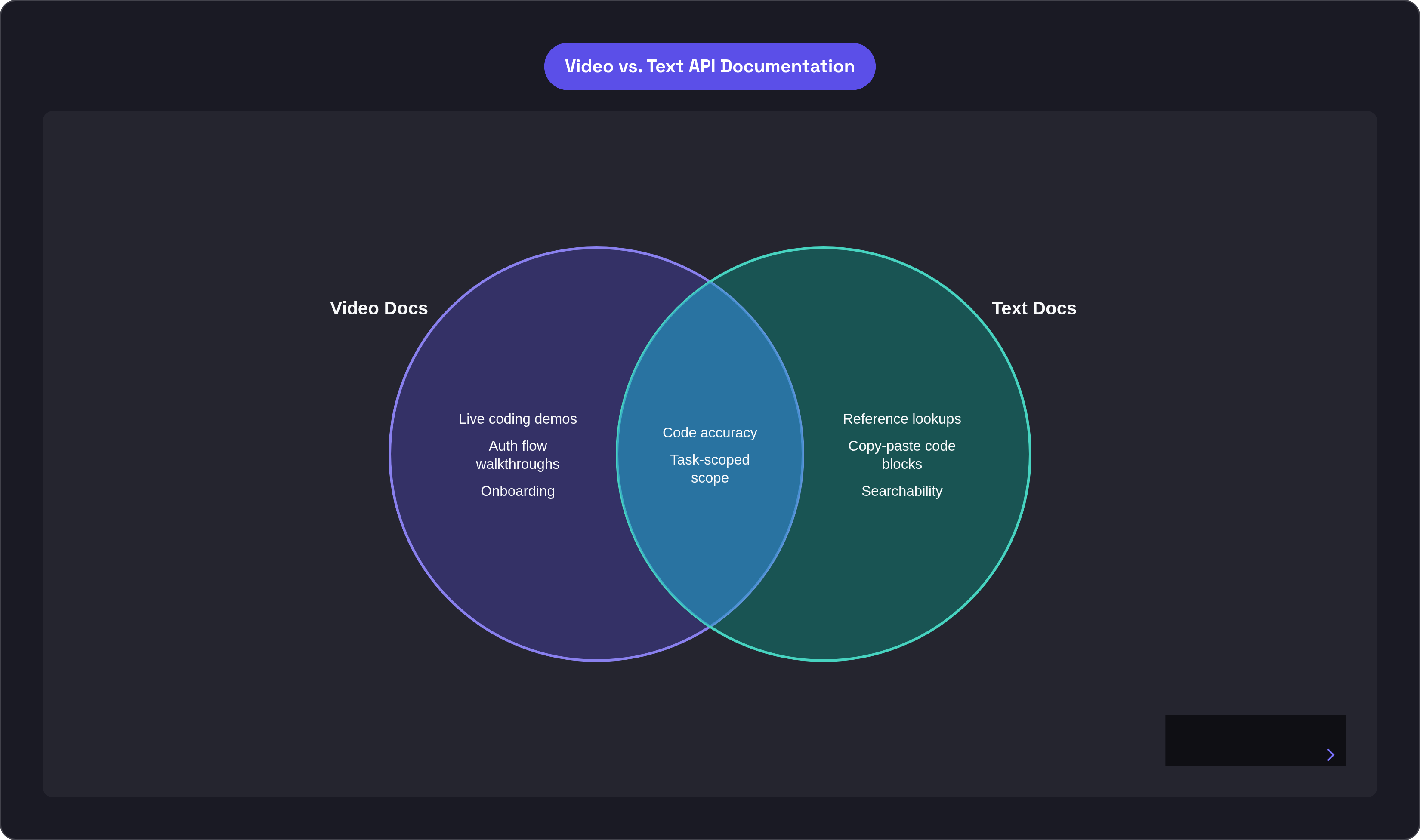
Video and text documentation are not the same thing in different formats. They are good at completely different things, and treating them as substitutes is how you end up with a program that does neither well.
Video excels at:
- Initial onboarding
- Auth flows (showing the handshake is genuinely clearer than describing it)
- Data transformations where seeing the before and after matters
Text documentation excels at:
- Reference lookups
- Copy-paste code blocks
- Searchability and indexability
Search engines cannot index spoken instructions. Developers cannot copy a command from a video. Every API walkthrough video should have a companion written guide with copyable code samples and clear section headings. The video and the doc are partners. Neither replaces the other, and teams that try to use one as a substitute for the other eventually feel that gap in their support queue.
The business case for getting this right is real. Teams using comprehensive video documentation report significantly fewer repetitive support requests. The reduction is measurable. It compounds as the video library grows.
The programs that do this best treat video as onboarding infrastructure and text as the persistent reference layer. The video gets a developer from zero to their first successful call. The text docs are what they use from that point on, every day, when they need to look something up fast.
The production bar for starting is lower than most teams think. A screencasting setup, a decent microphone, and a task-scoped structure are genuinely sufficient to ship your first five videos. Those five videos, covering your most common developer tasks, will handle the majority of your inbound questions. You do not need a studio. You need a plan, a focused scope, and code that actually runs when someone follows your steps.


