Building a Developer Tutorial Video Series
Developers abandon tutorials fast—make them about solving real problems, not showcasing features.

Summary
Developers abandon tutorials fast—make them about solving real problems, not showcasing features.
There was a team—small, scrappy, running on cold brew and determination—that decided to build a tutorial video series for developers. Not a marketing playlist. Not a highlight reel. A real series, the kind that actually teaches something.
They learned fast that developers are not a patient audience. Like a surgeon who's already scrubbed in, a developer who arrives at your tutorial has already committed to the problem—they just haven't committed to you yet. They will give your tutorial about thirty seconds to prove it is worth their time, and if it doesn't, they are gone. Building a tutorial video series that actually works for developers isn't about production polish or finding the right thumbnail. It's about making deliberate decisions at every stage. Structure, length, tooling, platform, measurement. Get those right, and a series becomes a genuine adoption channel. Get them wrong, and you've produced content that gets ignored. Not because video is the wrong medium (a 2024 TechSmith survey found 83% of people prefer video for instructional content, and 75% watch at least one per week), but because the series wasn't built with developers in mind.
How developers actually consume tutorial content
Developers are discerning viewers. Full stop. They are not watching to be entertained. They showed up because they have a problem, and they want to know if your video has the answer. If the first sixty seconds don't signal that, they click away.
What they want isn't just the steps. They want the reasoning. Why are we structuring this API call this way? Why this library and not that one? The "why" is what separates a tutorial from a recipe. It's also what builds trust. A developer who understands the reasoning can adapt it. One who just follows steps is stuck the moment anything changes.
The goal of a good tutorial is to move the viewer from watching to doing. Passive consumption is the failure state.
We saw this play out directly in a year-long, 52-episode series called Appsmith FTW. The top-performing videos by view count were not product walkthroughs. They were real use cases. Integrations with tools like Zendesk, Leaflet.js, and Google Sheets. Developers responded to content that showed the product solving a recognizable problem, not content that narrated a feature list.
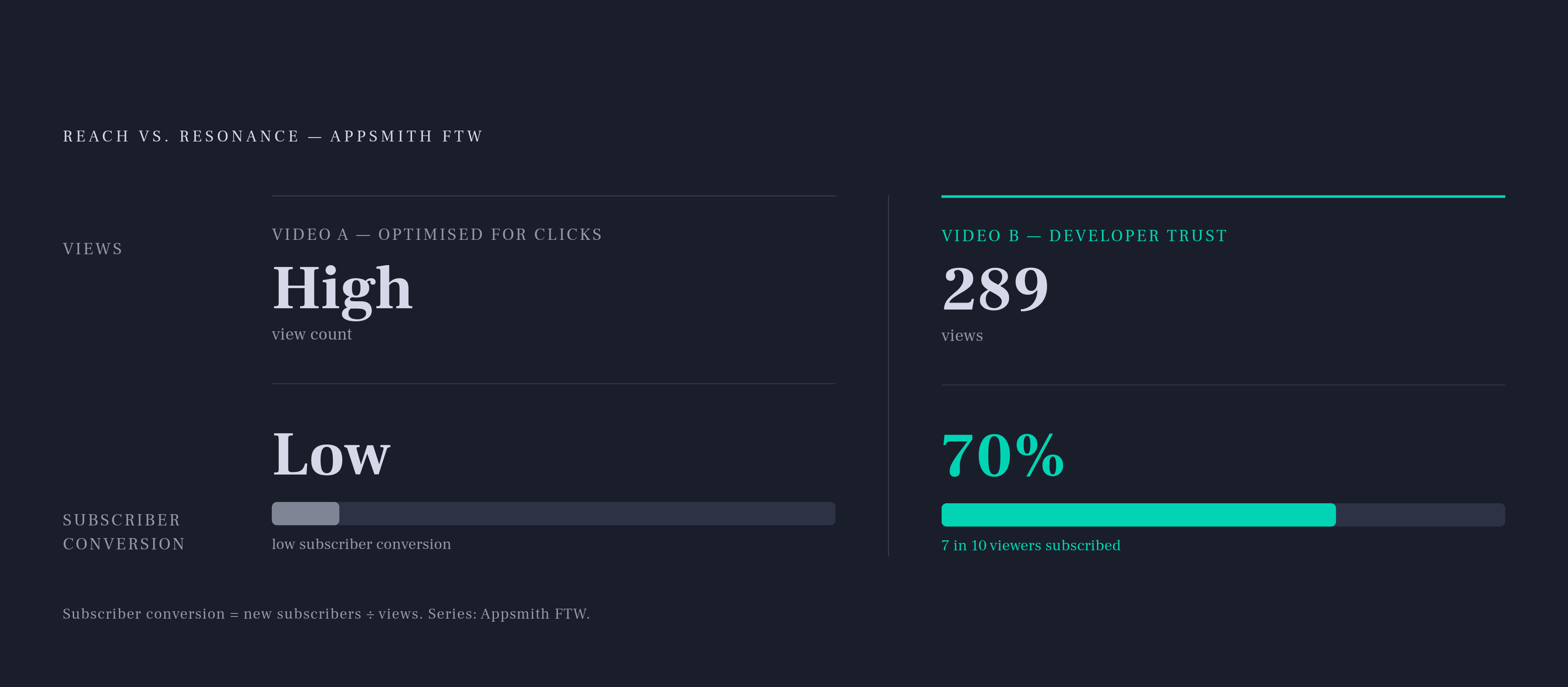
Here's the part that surprised us: the videos with the highest subscriber-to-viewer conversion were JavaScript-heavy and covered best practices or deep feature walkthroughs. One video had only 289 views. But it had a 70% subscriber conversion rate. A developer who watched that video trusted it enough to want more.
That's the distinction worth internalizing early: reach and resonance are not the same metric. A series optimized entirely for views is likely completely underperforming on the thing that actually matters, which is developer trust and, downstream from that, adoption.
Deciding on video length before writing a single script
Length is a decision you need to make before you touch a script. It shapes everything else.
Educational videos hold around a 56% engagement rate for content under a minute, dropping to 37% for the 5-to-30-minute range. But here's the thing: educational content consistently outperforms other formats at every length. The reason is simple. Viewers showed up to learn. They have more tolerance for duration because there's a payoff they're working toward.
Research from Suzhou City University reinforced the intuition that shorter is often better for retention: students using roughly 8-minute videos scored about 9% higher on assessments than students using roughly 55-minute videos. More time doesn't mean more learning.
Practically speaking, most focused developer tutorial topics land well in the 5-to-10-minute range. Complex, project-based content can stretch to 30 or even 60 minutes, but only when the audience has committed to learning a full workflow. The Appsmith FTW data confirmed this. Their top-performing videos ran 30 to 60 minutes, and every one of them was a full use-case build, not an overview.
The real rule: match length to scope. Not the other way around.
Padding a 6-minute topic to 20 minutes destroys retention. Cramming a full build into 5 minutes destroys comprehension. Both are bad. They just feel different while you're doing them. Think of it this way: padding a tutorial is like adding water to soup—it fills the bowl, but it doesn't fill the developer.
One trend worth building for now: organizational learning is shifting toward short, modular content that fits inside a developer's actual workday. A series architecture that supports both quick-entry clips and longer deep-dives serves more of the audience than one that commits to a single format.
Structuring a series so developers can navigate it on their own terms
The first structural decision is one most teams skip entirely: are you building a passive tutorial series (watch and follow along), or an interactive learning course (quizzes, branching, embedded exercises)? These are different products. They require different tools and a very different production commitment. Pick one and design for it.
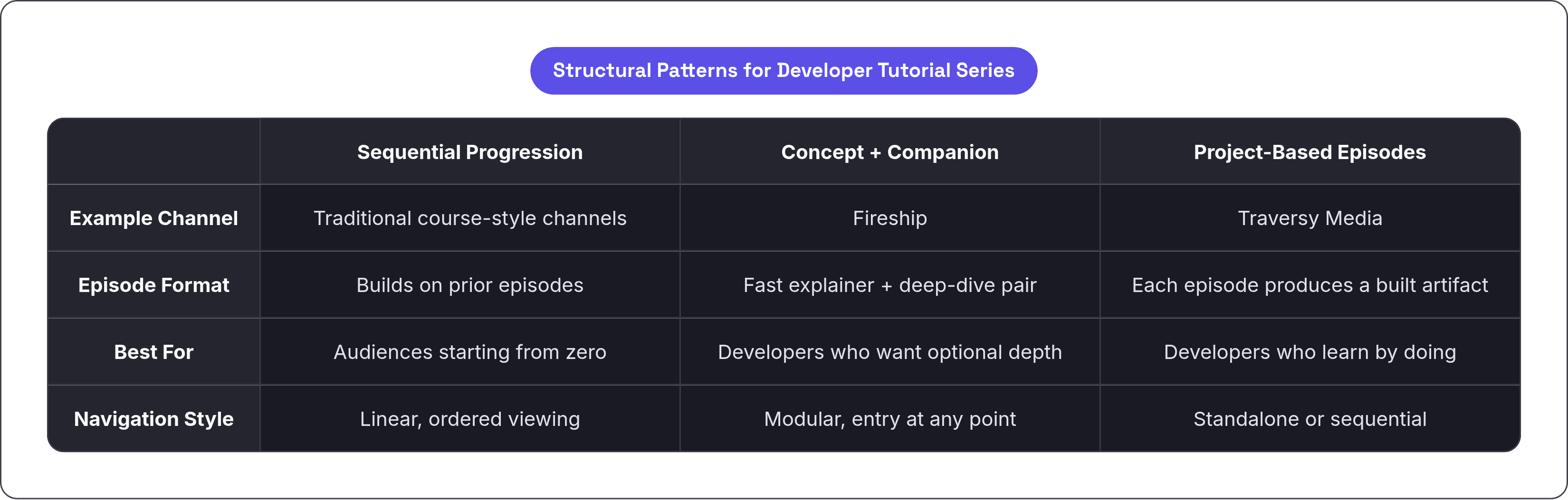
Three structural patterns show up consistently in successful developer channels:
- Sequential progressions. Episodes build from basics to advanced, and learners work through them in order like a course. Good for audiences that are starting from zero.
- Concept explainer plus companion. Fireship's "100 Seconds" model does this well. A fast, tight explainer paired with a deeper companion video for anyone who wants to go further.
- Project-based episodes. Traversy Media's model: every episode ends with something built. A landing page, an API, a full-stack app. Developers get a visible artifact from every episode they complete.
The best series have a story. Vimeo's instructional design principle puts it well: identify the story in the problem your series solves. The developer has a problem. They encounter the tool. They apply it. They succeed. That arc gives a series cohesion across episodes, even when someone watches them out of order.
On a practical level: break compound topics into named, focused episodes. Not "React Hooks." Instead: "Understanding useState," "Working with useEffect," "Custom Hooks in Practice." This serves both search discovery and the developer who only needs one piece of the puzzle. They will not watch four episodes to find the one answer they need. They will search for it and land directly.
Annual updates are also a marker of a serious series. Channels that re-release updated courses every year signal commitment and keep older content from becoming an active liability. Nothing undermines trust in a tutorial faster than deprecated syntax in the first code block.
Production decisions that keep developers watching past the first two minutes
The first two minutes are where you win or lose the audience. After that, they've decided to stay or they're already gone.
Clear audio is the highest-leverage single production variable. Before anything else. Before animations, before editing, before branding. If the audio is muddy, monotone, or inconsistent, you're done. A/B tests on YouTube have shown that consistent audio levels can boost engagement metrics by around 25%. The mic decision is straightforward: USB desktop mic for screen-recorded tutorials and voiceover work, lavalier for presentation formats, shotgun mic for controlled indoor setups.
Screen recording for coding demos has one specific technical requirement that matters more than most teams realize: the tool needs to capture individual clicks, keystrokes, and UI interactions as editable objects, not just as a flat video stream. This means a mistake during a live coding demo becomes an editable moment rather than a reason to re-record the whole segment.
Animations and live coding demos increase engagement more than static slides. The visual should match what the developer would see if they were actually doing this themselves. If they're watching a terminal, show the terminal. If they're watching a UI change, show the UI change in real time.
Pacing, titles, and descriptions that accurately set expectations are retention tools, too. A developer who clicks knowing exactly what they're going to learn is far more likely to finish the video than one who feels misled by the title.
Choosing a toolstack that matches your team's actual production capacity
The toolstack question is really a capacity question. How much time does your team actually have? Be honest about this before making any commitments.
Traditional video editing requires roughly 2 to 4 hours to produce a single tutorial. AI-powered platforms can bring that down significantly for teams creating at scale. The tiers break down like this:
- Speed-first async tools (Loom). Fastest path from explanation to shareable link. Free tier is limited to 25 videos at 5 minutes each; business plans start around $12.50 per user per month. Not built for production quality, but great for quick internal docs or team walkthroughs.
- Full-featured screen recording and editing (Camtasia, ActivePresenter). Frame-by-frame control. Best for polished coded demos where the capture quality really matters.
- Professional NLE editing (Adobe Premiere Pro, starting around $22.99/month). For teams with a dedicated video editor. Full control, full commitment.
AI-specific tools have legitimate use cases. Synthesia enables AI-avatar-driven tutorials, which is genuinely useful for multilingual rollouts or product demos where on-camera presence isn't available or practical. AI tools earn their place when they support instructional clarity: captions, translations, auto-summaries. They don't replace the subject-matter expertise that makes a tutorial credible to a developer audience. No AI avatar has actually debugged a race condition at 1am. Developers can feel the difference.
Interactive eLearning features (quizzes, hotspots, branching) require a completely different category of tool: H5P, Articulate Storyline, Edpuzzle. And the decision to add interactivity isn't just a production decision. It's a product decision. Research involving 183 students over 10 weeks found that embedded in-video questions improved quiz scores, participation, and self-regulation compared to questions asked after the video. The case for interactivity is real. But only pursue it if your team can actually sustain the production overhead on an ongoing basis.
Where to publish and how platform choice affects who finds your series
YouTube is still the default for developer tutorial discovery. It's the largest video search engine, embedding is frictionless, and there's no access friction for public content. Those three things together make it hard to argue against as a starting point.
That said, the algorithmic risk for long-form educational content is real and has gotten worse. Creators producing 20-minute educational videos have seen view counts drop 30 to 60% on algorithmically similar content between 2022 and 2025 as YouTube's algorithm increasingly favors shorter content that competes on session metrics. This doesn't mean YouTube stops working. It means you can't rely on it as your only distribution channel.
LinkedIn is now the primary B2B video platform. Around 8 in 10 B2B teams say it's their main platform for video sharing, and video posts there generate roughly 5 times more engagement than other content types. If your developer tool is targeting engineering teams or decision-makers at companies, LinkedIn is not optional.
Vimeo suits premium or gated content: paid courses, gated developer programs, anything where you want stronger privacy controls and a more intentional viewing experience. One note worth flagging: Bending Spoons acquired Vimeo in early 2023, with layoffs following later that year. Pricing stability should be verified before you build any serious production infrastructure around it.
Multi-platform publishing isn't just a growth tactic anymore. It's a risk management strategy. Distributing across YouTube, LinkedIn, and an owned property reduces your dependence on any single algorithm.
There's one more shift worth planning for: developers increasingly begin product research through LLMs (ChatGPT, Perplexity, Claude) rather than through Google. Tutorial titles and descriptions written with concrete, implementation-level framing, the same framing that surfaces well in AI-generated answers, serve both traditional SEO and LLM discoverability at the same time. Framing your title as "How to Connect Google Sheets to Appsmith" is not just good YouTube SEO. It's the exact kind of query a developer types into an LLM.
Measuring whether a series is actually working
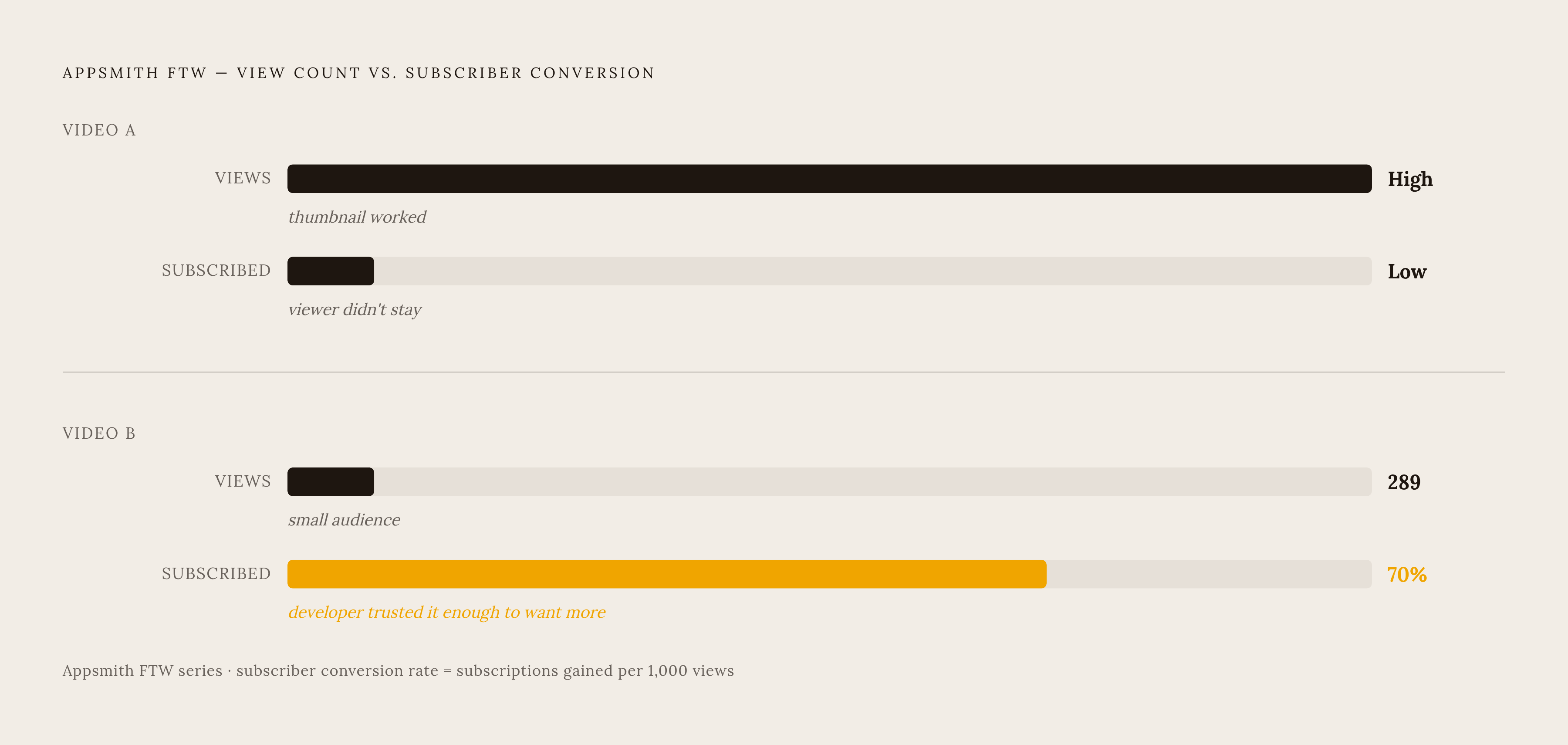
View count is the weakest signal for a developer tutorial series. The Appsmith FTW data makes this concrete. A video with 289 views and a 70% subscriber conversion rate is doing more meaningful work than a high-view video that generates no lasting engagement. Views tell you that the thumbnail worked. They don't tell you that a developer learned something and came back for more.
The metrics that actually matter:
- Subscriber conversion rate per video. Did watching this episode cause someone to want more?
- Watch-through rate. Does the audience finish the episode? Drop-off at 40% is a pacing problem. Drop-off at 80% is a conclusion problem.
- Downstream actions. Signups, repo clones, API calls. These tell you that someone moved from watching to building.
Comments and questions are qualitative signal that's easy to undervalue. A developer asking a follow-up question in the comments is demonstrating exactly the kind of active engagement that predicts adoption. That comment is a data point.
At the series level: are viewers from earlier episodes watching newer ones? Playlist completion rate tells you whether your curriculum architecture is holding together or whether developers are treating every video as a standalone item. Both can be fine, but you need to know which one is happening.
Content gaps show up in analytics, too. Search terms that land on your channel but don't match any existing video are your next series topics. Someone is already looking for that content. They just couldn't find it.
The real standard for a working series isn't virality. It's simpler than that. A developer finishes an episode, opens their editor, and builds something. That's it. That's the whole goal.


