Structuring Developer Tutorial Videos
Follow this five-part structure to keep developers watching past eight seconds.

Summary
Follow this five-part structure to keep developers watching past eight seconds.
A developer clicks a tutorial video ready to bail within eight seconds if the hook fails to deliver. The whole piece here is about structure: hook, setup, steps, gotchas, recap, in that order, each section doing a specific job for the viewer's brain. Skip a job or do it out of order and the tutorial breaks, no matter how good the code is.
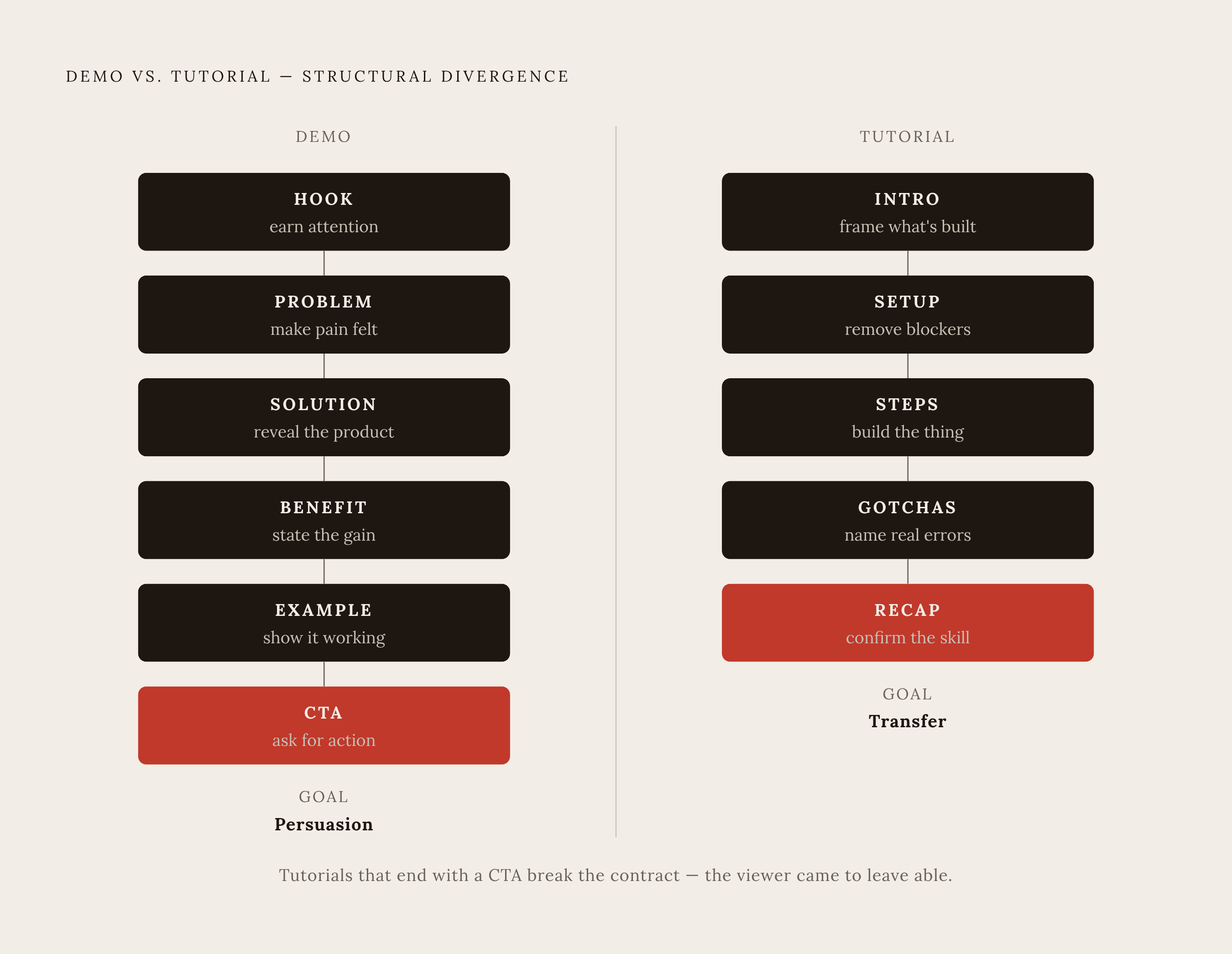
A tutorial is not a demo. A demo runs HOOK → PROBLEM → SOLUTION → BENEFIT → EXAMPLE → CTA because its job is persuasion, getting someone to want the thing. A tutorial runs INTRO → SETUP → STEPS → GOTCHAS → RECAP because its job is transfer: the viewer leaves able to do something they couldn't do forty minutes ago. Different goal, different skeleton. Developers punish anyone who confuses the two. They don't want to be sold. They want to leave with a working auth system and the ability to explain why it works.
Why the First Eight Seconds Matter Most
Most viewers decide to stay or bail within the first eight seconds, which is shorter than most creators budget for. There's no time for channel pleasantries, no time for a logo animation, no time to thank the sponsor before anyone knows what they're getting.
Compare these two openings side by side. "By the end of this video, you will be able to build a fully functional authentication system." Versus: "Hey guys, welcome back to my channel." One tells the viewer exactly what they walk away with and how long it costs them. The other tells them nothing, and burns four of the eight seconds they had to make a decision.
A hook that works does three things quickly: names the specific problem, signals who this is for (junior dev? someone who already knows React but not hooks?), and confirms the viewer landed in the right place. Skip any of those three and you're gambling with a stranger's attention span.
Vague openers kill tutorials quietly. Channel intros, biographical throat-clearing, sponsor reads before any value has been shown, and broad framing like "Today we'll look at authentication" all register as filler to someone who came for a specific answer to a specific problem.
Topic selection does half the hook's job before the video even starts recording. "How to use useEffect with async functions in React" is a title that filters its own audience. "React Tips for Beginners" pulls in everyone and satisfies no one. Narrow topics make hooks easier to write because there's less to explain and less room to hedge.
Narrow topics come from Stack Overflow threads, r/learnprogramming, and Discord servers full of developers hitting the same wall at 11pm. If the same question shows up five times in a week, the hook practically writes itself: "here's why your useEffect keeps firing twice, and how to stop it."
What to Establish Before Code Appears
Setup exists so the viewer never has to pause the video and open a second tab to Google something the tutorial should have told them upfront. Three things belong here, stated quickly: what the viewer needs to already know, what environment they need running, and what the finished result looks like. Precise enough that someone at the wrong skill level or on the wrong tech stack leaves in the first ninety seconds instead of at the twenty-minute mark.
Good setup also does an emotional job. It tells the viewer they're in the right place, that this matches their skill level, and that they should follow along with confidence. A nervous viewer reads every stumble as their own fault instead of a normal part of learning, so establishing that confidence early is worth as much as any technical detail in the section.
Showing the finished output early does something useful structurally. It gives the viewer a concrete target before the steps begin. If the viewer sees the working login screen at minute two, every step after that is oriented toward a specific result they've already seen. Google's own technical-writing guidance treats a clear scope statement and logical outline as a requirement of the format, not an optional nicety.
Setup should never become a history lesson about the technology, a product comparison, or a philosophical argument for why authentication matters. That content belongs nowhere in a tutorial.
Why Before How: Steps That Actually Teach
Type this, then type that, then run this command. That's dictation, not teaching, and it produces a developer who can follow a script perfectly and cannot debug anything when the script doesn't match their situation. That's a content failure, not a learner failure.
Every step needs both halves: what to do, and why it needs doing. "Add this middleware" teaches nothing. "Add this middleware because without it, the token never gets validated before the request hits your protected route" teaches something that survives past this one tutorial.
Break the steps down into numbered, discrete chunks. Smaller chunks help viewers pause, try it themselves, and come back, which is how people actually learn to code. Code examples should appear as short, explained snippets rather than a wall of text pasted in one block.
Editing matters here more than people acknowledge. Cutting dead air and unnecessary build-spinner pauses signals to a developer audience that their time is being respected, and developers notice sloppy editing quickly.
Scripting for this section works best when written for the ear: short sentences, contractions, around 125 to 150 words per minute of finished footage. A two-column script with audio on the left and visuals on the right keeps the edit clean and clarifies what should be on screen at every moment.
Text overlays are useful during steps when they point at the one line of code that actually matters, rather than leaving the viewer to guess which of forty lines on screen is important. Used well, overlays reinforce without interrupting. Used badly, they become visual noise competing with the narration.
Naming the Errors Viewers Will Actually Hit
For a developer audience, skipping the gotchas section reads as either dishonest or naive, since anyone who has actually run the code knows it broke somewhere, on some machine, in some environment. A tutorial that pretends nothing ever goes wrong has not earned trust.
What belongs here: the errors viewers will actually encounter, not hypothetical ones. Environment quirks. Version conflicts between runtime environments that change how a package resolves. The situation that looks correct, compiles clean, and still fails silently, along with the specific reason why.
Framing matters significantly in this section. "Here's what you probably did wrong" stings and puts blame on the viewer. "Here's what the system does in this situation, and why" maintains the same why-before-how discipline running through the steps section, and reads as diagnosis rather than accusation.
This section determines whether someone finishes the tutorial or closes the tab in frustration. A viewer who hits an unexplained error typically assumes they broke something and gives up. A viewer who hits that same error and finds it addressed on screen, with a fix, keeps going. Retention here is a direct structural outcome of whether the error got named.
Show the broken state before showing the fix, so the viewer can recognize the error message as the same one they encountered.
Keep the scope tight. The gotchas section is not a general troubleshooting guide for the whole framework. Trying to include unrelated edge cases buries the specific fix the viewer needs.
Close the Loop: Recap and Working Output
The hook made a promise. The recap's only job is proving that promise got kept. If minute one said "you'll build a working auth system," the final minutes need to show a working auth system on screen, functioning, not described in past tense.
Showing the finished output working is structural, not decorative. It confirms the steps actually worked and gives the viewer a checkpoint: if the result matches what's on screen, they're done and confident. If it doesn't, they know exactly where to go back and check.
A strong recap names specifics: here's what you can now build, here's the core concept you just used (JWT validation, not just "we did some auth stuff"), and here's where to go if this only scratched the surface. Linking to deeper material follows the same progressive-disclosure logic Google's writing guidance recommends: the tutorial ends, but the learning path continues past it.
A weak recap replays the steps in order out loud, which the viewer doesn't need since they just watched them happen, or drops a flat "thanks for watching" without confirming the output works. A call-to-action, if it appears at all, only earns its place after the working result is on screen. Placing it earlier converts the tutorial back into a demo, which is the structural error this piece opened by describing.
How Tutorial Structure Improves AI Discoverability
Procedural "how do I" questions are exactly the shape AI answer engines search for, and a well-built steps section maps onto that shape almost perfectly. Numbered steps and discrete code blocks are straightforward for a machine to extract cleanly.
A paper out of Princeton, IIT Delhi, Georgia Tech, and the Allen Institute (arXiv:2311.09735) tested nine content strategies across 10,000 queries in 25 domains. Citations, statistics, and direct quotations each produced 30 to 40% higher AI visibility, measured by a metric the paper calls Positioned At Word Count. Tutorial content that names specific functions, specific error messages, and specific version numbers gives AI systems pre-packaged, quotable facts rather than vague prose that requires interpretation.
A tutorial written in flowing paragraphs with no clear heading hierarchy, and with steps buried inside sentences rather than broken into numbered chunks, is harder for both humans and machines to parse. It tends to get passed over in favor of content that presents discrete, well-labeled facts.
Previsible's 2025 AI Traffic Report recorded AI-referred sessions up 527% year-over-year in the first five months of 2025. Developer tutorial content is entering a distribution channel that rewards the same structural habits that already serve human viewers: clear steps, named specifics, and no padding.
Schema markup adds a second layer on top of the structural work already in the writing. BlogPosting, FAQPage, and Speakable tags don't replace good structure; they reinforce it, making an already well-organized tutorial more legible to whatever is crawling it.
Measuring AI discoverability means testing specific prompts like "how do I build authentication with X," not vague brand-awareness metrics. The same narrow, specific topic that makes the eight-second hook effective also makes the tutorial testable against an AI query. Specificity serves the viewer and the discoverability strategy simultaneously.

