Changelog and Release Videos for Developer Products
Video works best for showing breaking changes and workflow shifts, not logging routine updates.

Summary
Video works best for showing breaking changes and workflow shifts, not logging routine updates.
Most developer product teams maintain a changelog and release notes as though they are the same document, blurring them into a single format that half-satisfies both jobs. When video enters the picture at all, it gets grafted onto whichever format the team already had, usually the changelog, because that is what already exists.
That instinct is wrong in a specific and consequential way. Video belongs closest to release notes, not the changelog, because video's entire advantage is in picking, framing, and explaining a small number of meaningful changes rather than logging everything that shipped. A changelog built for engineers scanning for a specific API parameter has no use for a three-minute walkthrough of every merged pull request.
Forcing video into that format at that cadence produces something nobody watches. Meanwhile, the changes that genuinely needed demonstration, the ones with breaking behavior, new integration paths, or restructured workflows, get a two-sentence text entry that sends developers straight to the support queue.
Who actually reads developer product update content
Developers are the obvious audience, and they want it scannable. That is why Stripe, GitHub, and Vercel all default to plain changelog format: dated, categorized, no narrative fluff. A developer scanning for one API parameter does not want a story arc.
But the audience is bigger than the people writing code. Prospects check changelogs the way they would verify that a service is still actively maintained: a liveness test before they commit to evaluating a product further. Sales and support teams read changelogs to stay current so they are not caught flat-footed on a call. Feature requesters check back specifically to see if their request was addressed, which is its own small but meaningful moment of trust-building or trust-breaking.
Karri Saarinen, co-founder and CEO at Linear, has pointed to two audiences most teams forget entirely: candidates and investors. A changelog is a public record of how fast and how well a team ships, and both groups read it that way whether the team intends it or not.
Cadence matters too. Elite-performing teams deploy multiple times a day, so a format built for monthly summaries breaks down fast at that speed. The buyer side has shifted hard toward self-service on top of that: Gartner's 2025 survey found 61% of B2B buyers now prefer a rep-free buying process, and the G2 2024 Buyer Behavior Report, surveying 1,940 software decision-makers, found 83% prefer to self-serve during discovery. That makes the changelog a sales asset whether or not marketing signed off on it being one. AI assistants are increasingly scanning changelogs on a buyer's behalf too, which turns "can an AI read and cite this" into a distribution question, not just an SEO consideration.
The audience is wide, but the format still answers to the pickiest reader in the room: the developer who detects padding or hype from three sentences away and closes the tab.
Where written changelogs work and where they fail
Text is precise and text is searchable. A developer can grep a CHANGELOG.md for a specific flag or parameter name in seconds. ProductLift's data across 6,035 product teams found that teams with active changelogs see 34% higher engagement on feedback boards than teams without one. Keeping the log alive keeps users talking back.
Text starts to fail the moment a change needs to be shown rather than described. A new interaction pattern, a workflow that got restructured, a config setting with three valid ways to use it: attempting to explain any of those in two sentences either oversimplifies the change into uselessness or buries it in jargon nobody outside the team will parse.
Text fails on consequence even more often. Compare "Added advanced filters" to "Refine your views with AND/OR conditions to see exactly what matters." The same feature is present in both entries, but only one tells a developer why they would bother clicking in.
Breaking changes are where the gap between text and video becomes expensive. A written entry that buries a breaking change three bullets deep is a support ticket with a delay timer attached. A 90-second video that opens with "if you use X, here is exactly what breaks and what to change" earns trust immediately, because it communicates that the team understands the cost of the change to the people receiving it. Text handles the record. Video handles the demonstration and the consequence. Neither substitutes for the other.
When release video actually earns its place
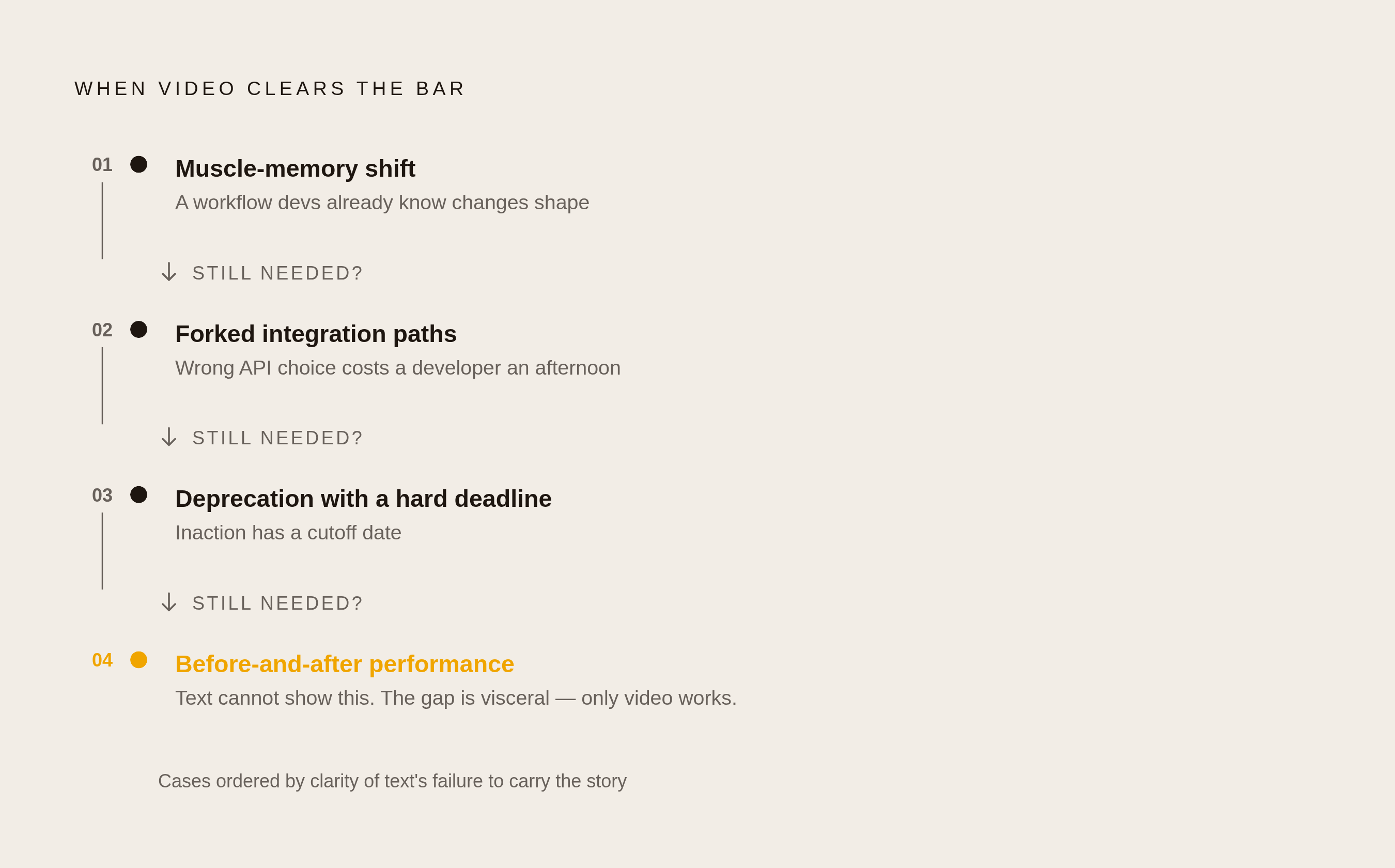
Not every release deserves a video, and most do not. A routine bug fix does not need a screen recording, and a dependency bump does not need one either. Forcing video at that cadence cheapens the format: if every entry gets the video treatment, none of them signal that a particular change actually matters.
Video earns its place in four specific situations. When a feature changes a workflow developers already have muscle memory for. When a new API surface has multiple integration paths and picking the wrong one costs someone significant debugging time. When a deprecation has a deadline attached and people need to act before it hits. And when a performance change is invisible in text but immediately obvious in a before-and-after demo, the kind of result where a chart communicates more in five seconds than a paragraph does in thirty.
Chameleon's 2024 data supports this directly: release notes that include visuals produce 28% more first-time feature usage, which is the highest-value outcome a product update can generate. The best release video setups let marketing and documentation run through the same production pipeline. That matters when the team producing this content is small, and most teams producing this content are small: the State of Product Marketing Report 2025 found 44.3% of PMM teams are still one or two people.
That constraint argues against high-production one-off videos and in favor of tight scope, repeatable templates, and a format that does not require a studio. Video is a precision tool here, not a default upgrade applied to every release. Teams that treat it as a default are the ones burning a two-person marketing team's entire week on a change nobody asked to see demonstrated.
Structural choices that make release videos work
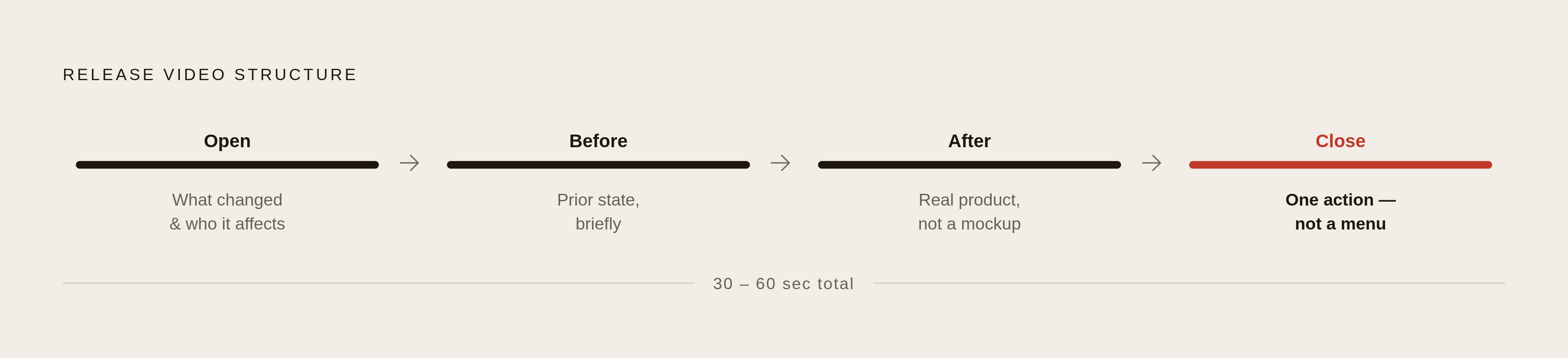
Runtime is where most release videos go wrong first. The strongest feature announcement videos from SaaS companies run 30 to 60 seconds. Long enough to actually show the workflow, short enough to respect that a developer's attention is not freely given.
Structure follows a pattern that works consistently: open with what changed and who it affects, show the before state briefly, demonstrate the after state inside the real product rather than a mockup, and close with exactly one action the viewer should take.
Screen recording has its own discipline. Record at the resolution developers actually use, not an idealized crop. Show real data, not placeholder text. Never cut away from an action before it finishes, because that is the video equivalent of a changelog entry that trails off mid-sentence without explaining what the change actually does.
Voiceover earns its place when it adds context the screen alone cannot carry, such as why a parameter was added or what failure mode prompted a fix. Silence plus captions works well when the action is self-explanatory. The choice should be driven by what the specific change needs, not by which option feels more polished.
The clearest example of format done right comes from Arc. CEO Josh Miller turned release notes into episodic, founder-hosted video updates that users genuinely looked forward to watching. The format worked because it created a sense of insider access, not because of production polish. Arc was frozen in May 2025 as the Browser Company pivoted toward its AI browser, Dia, which Miller first demonstrated publicly on December 2, 2024, also via video. Arc is proof of what is creatively possible with this format, not an active playbook to copy today. The underlying principle survives the pivot: a face and a voice build a kind of connection a text entry structurally cannot carry, but the format has to stay proportionate to the product story it is carrying or it starts to feel performative.
Breaking-change videos follow their own structure: lead with the consequence by stating which users are affected and what breaks, show the old behavior, show the new behavior, and link directly to the migration docs. The breaking change must appear at the start of the video, not buried in the middle where a distracted viewer might miss it entirely.
Tone and voice for developer release videos
Listing what changed without explaining why it matters produces something developers click past in the first four seconds. The consequence of the change has to be communicated directly, not left for the viewer to infer, because a viewer who has to do that inferring will simply leave instead.
Different developer tools have found genuinely different registers that work for their audiences. Vercel writes in an unapologetically technical voice, with configuration examples and architectural detail included directly in the notes. Raycast uses short product-area prefixes and a conversational tone. Notion leans into narrative and visual storytelling, framing features around what users can now do rather than what technically shipped. None of these registers are wrong. They are matched to how each company's users actually communicate with each other.
For most developer-facing video, precision beats enthusiasm and specific language beats vague language without exception. Vercel's technical directness would work well on camera. A playful register that suits internal team communication would read as noise on a video meant to explain a breaking change to backend engineers, and that mismatch is more damaging than picking either register consistently.
Some phrases fail when spoken aloud in ways they do not on the page. A video that gestures at "better performance" without showing a number or a chart earns immediate distrust, because the viewer assumes there is nothing concrete to show. Going the other direction fails just as badly: reading "refactored auth middleware for JWT validation" aloud to a general audience helps nobody. If a technical detail cannot be translated for the intended viewer, it should be cut from the script.
Consistency matters more than any single stylistic choice. If one video is casual and founder-led and the next is formal and written by committee, that inconsistency breaks the implicit promise the format made in the first place. Pick a register and hold it across releases.
Raycast's "Raycast Wrapped 2025," a year-in-review showing users their own productivity stats, demonstrates that occasional format surprises can deepen the relationship with an audience. But that only works once the baseline format has already earned trust over time. A surprise as a first move reads as a gimmick rather than a gesture.
How to scope and script without padding
Start from the changelog entry itself, never from a blank page. The entry already represents an editorial decision about what was worth shipping and mentioning. The video script's only job is to expand the parts that genuinely need demonstration, not to reinvent the framing from scratch.
A workable formula drawn from release writing best practices requires that the opening line of the script answers three questions: what is the surface area of the change, what type of change is it, and what is the reason or outcome. If the opening line cannot answer all three, the scope of the video needs to be revised before recording begins.
One video should cover one change. Bundling a minor tweak with a major API overhaul in the same clip obscures both and forces the viewer to sit through content intended for someone else.
The linking principle from text carries over to video: the video is the entry point, and documentation is the deep dive. Every release video should end with a specific link to the relevant documentation or migration guide, not a generic call-to-action button.
If something is a known limitation, name it in the video. Developers respond better to that kind of transparency than they do to a polished omission, and glossing over a known issue relocates the problem to a support queue a week later.
Before recording, run the script through a short checklist. Does the opening line state what changed and who is affected? Does the demo show a real workflow rather than a toy example? Does the close name one specific action? Any no means the script needs revision, not a camera.
Distribution that reaches the right developers
The best-read changelogs run three channels at once: an in-product notification widget for active users, a periodic email digest, and social media reserved for the most significant features. That is the baseline.
Developer products need a fourth channel that teams frequently skip: the changelog page itself, with the video embedded directly inline. Developers already scanning the changelog are the highest-intent audience available, and requiring them to navigate to an external video platform to watch a 40-second clip is unnecessary friction.
Subject lines determine whether an email digest gets opened. "Webhook retry parameter is live" earns a click. "This week's updates" gets ignored, because it promises nothing specific to the reader.
Segmentation matters more than raw reach. A developer hitting the API daily and a prospect still evaluating the product are both reading the same changelog page, but they need different framing to act on what they see. In-app notifications can surface the video only to users who have already interacted with the affected feature. Email can go to the full list. Social gets the version stripped of any content that assumes prior product context.
A hybrid production model works well for small teams: automated drafting flags which changes meet the bar for video treatment, and a human signs off on the script before recording begins. That keeps volume manageable for a two-person PMM team without losing editorial judgment about which changes actually deserve the format.
According to Supportbench, well-done release notes can reduce support tickets by up to 40%. For a small team, that deflection alone can justify the production cost before adoption numbers are even factored in.
Measuring whether release videos changed developer behavior
View count is the wrong metric to optimize for. A video with a thousand views and zero adoption lift is a production expense with nothing to show for it. A video with sixty views, all from the developers who then used the new feature that same week, is the meaningful result, even though it looks smaller in a dashboard.
The metrics worth tracking are first-time feature usage among viewers compared to non-viewers, support ticket volume on the affected surface in the week after publishing, and documentation traffic coming specifically from the video's linked call to action. Chameleon's 2024 figure of a 28% lift in first-time feature usage from visual release notes is the benchmark to measure against and the number that justifies the budget to a skeptical stakeholder.
When a video produces no measurable result, that outcome needs an actual explanation. It could mean distribution failed and the intended audience never saw the video. It could mean the wrong audience segment was targeted. It could mean the underlying change was too minor to warrant video treatment in the first place. Or it could mean the measurement itself broke somewhere upstream. Treating all four causes as equivalent leads to the wrong corrective action, and applying the wrong fix repeatedly is how a team ends up discontinuing a format that was never actually the problem.
If a whole category of change keeps underperforming on adoption regardless of video quality, that is a signal to stop producing video for that category and redirect the effort toward changes where demonstration actually moves the adoption number. The evidence should set the production schedule.
One additional signal worth monitoring as it develops: whether AI answer engines surface a specific release when a user asks a feature question. Changelog pages and embedded video transcripts are both crawlable and citable content, and tracking whether that content gets pulled into an AI-generated answer is an early indicator of content authority that reaches beyond what direct traffic analytics will show.
